Guideline Value Certificate Download: Step-by-Step Process
If you need a Guideline Value Certificate for property transactions in Tamil Nadu, TNREGINET makes it easy to download online. This certificate shows the official government value of a property, which is used for stamp duty calculation, property registration, and legal purposes.
This guide explains the step-by-step process to download your certificate and avoid common mistakes.
What Is a Guideline Value Certificate
A Guideline Value Certificate is an official document issued by the Tamil Nadu Registration and Stamps Department. It indicates the minimum value of a property in a particular area for legal and taxation purposes. Banks, buyers, sellers, and legal authorities often require this certificate during property transactions.
You can also read: How to Handle EC Certificate Errors on TNREGINET Portal 2026
Step-by-Step Guide to Download the Certificate
Follow these steps to get your Guideline Value Certificate on TNREGINET:
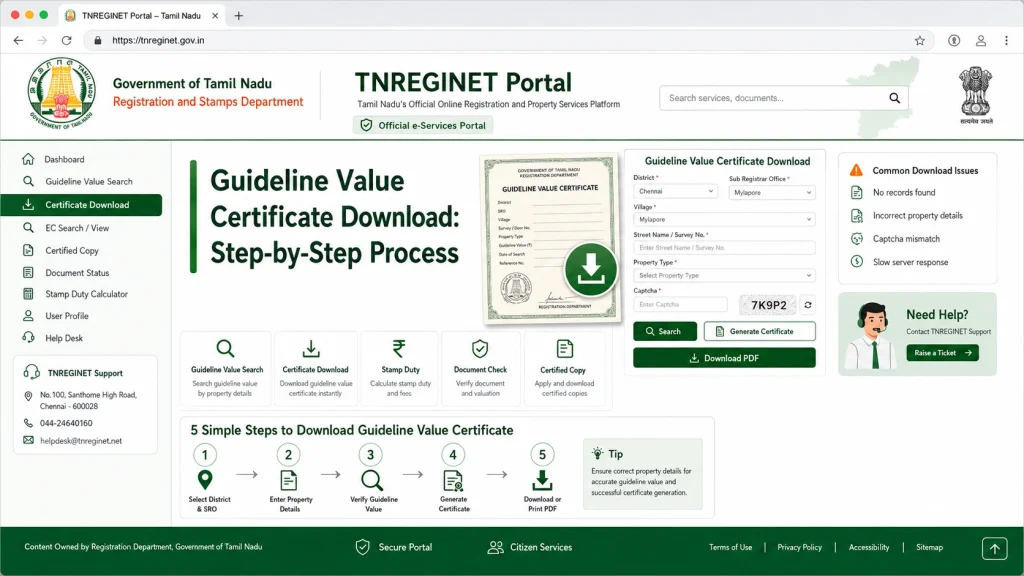
Visit the TNREGINET Portal
Go to the official TNREGINET website and select the Guideline Value section.
Log In
Use your registered account credentials to log in. You may need OTP verification for security.
Select Property Details
Enter the district, zone, property type, and other required details accurately. Double-check the survey number and area information.
Search for Guideline Value
Click the search button to display the official guideline value for your property.
Download Certificate
Once the guideline value appears, select the option to download the certificate as a PDF. Save it for future reference.
Verify Certificate Details
Make sure all property information is correct on the certificate. Any errors can affect registration or legal processes.
Common Issues During Download
Incorrect Details:
Entering wrong survey numbers or property zones may result in errors.
Portal Loading Problems:
TNREGINET servers may slow down during peak hours. Try early morning or late evening.
PDF Errors:
Sometimes the downloaded certificate is blank or incomplete; retry using a desktop browser.
Login/OTP Issues:
Ensure your registered email/mobile is active for OTP delivery.
Tips for a Smooth Download
Understanding Guideline Value Updates
Guideline values are updated periodically by the government to reflect changes in property market trends. TNREGINET ensures users always access the most recent values, but older property data may show previous guideline values. Always check the year or notification number on the certificate to confirm its validity for your transaction.
Importance of Guideline Value Certificate in Property Transactions
This certificate is crucial for:
Calculating stamp duty and registration fees accurately
Ensuring legal compliance in property deals
Assisting banks in property loan approvals
Avoiding disputes due to undervaluation or overvaluation of property
Having a proper guideline value certificate simplifies property buying, selling, and legal verification.
Table: Steps vs Common Issues
| Step | Common Issue | Solution |
|---|---|---|
| Log In | OTP not received | Check registered mobile/email, retry after a few minutes |
| Enter Property Details | Incorrect survey number | Verify details with property documents |
| Search | No result found | Confirm property zone/district accuracy |
| Download PDF | Blank or corrupted file | Use desktop browser and retry download |
| Verify Certificate | Wrong details | Request correction at sub-registrar office |
Best Practices for Using the Certificate
How to Correct Errors on a Guideline Value Certificate
If you notice errors in the downloaded certificate, you can:
This ensures smooth property registration and avoids disputes.
FAQs
Final Words
Downloading a Guideline Value Certificate from TNREGINET is simple when you follow the correct steps. By understanding updates, verifying property details, and correcting errors proactively, you can ensure smooth property registration and avoid unnecessary delays.
Always keep the certificate ready for legal, bank, and property transaction purposes.