TNREGINET: How to Fix Errors in Property Registration 2026
Property registration is a crucial part of any real estate transaction, and errors in property details can cause significant problems, from delays to legal disputes. TNREGINET, Tamil Nadu’s online portal for property registration, provides a streamlined process for property transactions. However, sometimes errors can occur during the registration process, either in the property details, owner information, or transaction history.
In this article, we will walk you through the most common errors in property registration on TNREGINET and how to fix them.
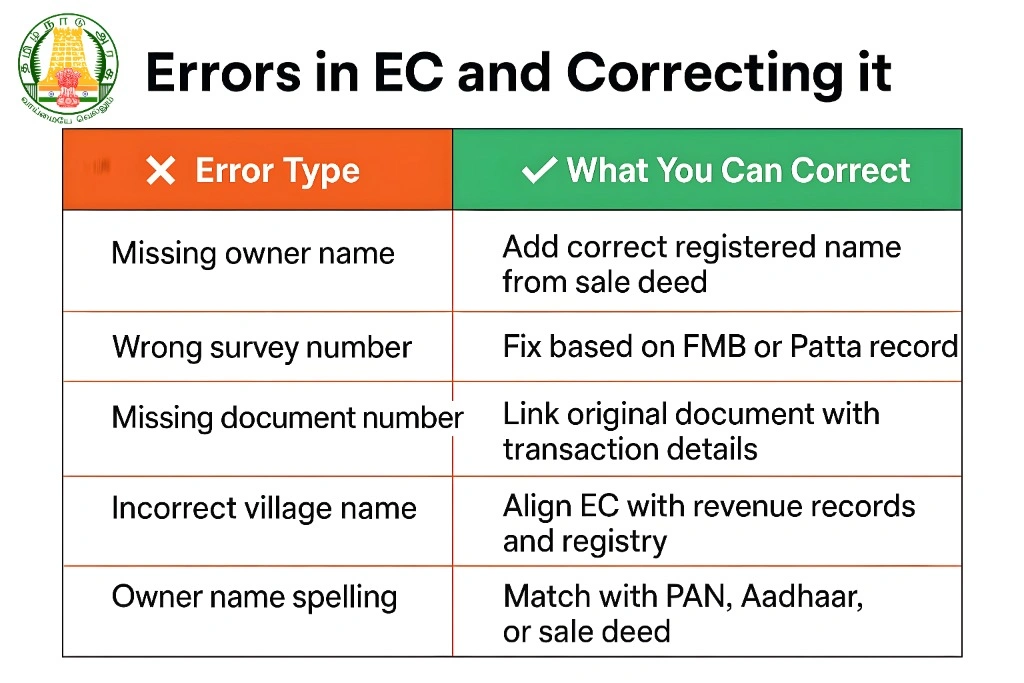
Common Errors in Property Registration on TNREGINET
Incorrect Property Details
Problem: Sometimes, the survey number, plot number, or district may be entered incorrectly, leading to errors in the property record.
Solution: Double-check the property details, including the survey number, document number, sub-registrar office, and property type. Compare the details with your official documents, such as the Sale Deed, Patta, and Chitta. If the details are incorrect, you will need to correct them at the Sub-Registrar Office.
Wrong Owner Name or Ownership Details
Problem: Mistakes in the owner’s name or ownership details (such as spelling errors or incorrect title) can cause discrepancies in the registration process.
Solution: If the owner’s name is incorrect, you will need to request a correction at the Sub-Registrar Office. Provide proof of identity (like an Aadhaar card or PAN card) and other supporting documents to confirm the correct ownership information.
Data Mismatch Between Sale Deed and Registration Details
Problem: Sometimes, the Sale Deed details may not match the information in the TNREGINET system. This can occur if there is an error in the document number, date, or other details.
Solution: Compare the details in the Sale Deed with the details in the TNREGINET system. If there are discrepancies, contact the Sub-Registrar Office to rectify the error. You may be asked to provide a copy of the Sale Deed and any relevant supporting documents.
Missing Transaction History or Encumbrance Data
Problem: If your Encumbrance Certificate (EC) is missing certain transaction history or encumbrance details, it could be due to errors in the data entry or updates to the land records.
Solution: If the EC is missing data for a particular period, you can request an updated Encumbrance Certificate from the Sub-Registrar Office. You can also try checking the date range while requesting the EC on TNREGINET, ensuring you’ve selected the correct time period.
Incorrect Property Type Classification
Problem: Properties may sometimes be incorrectly classified as residential, commercial, or agricultural, leading to issues with the stamp duty or registration fee.
Solution: If your property is misclassified, you’ll need to provide the correct property type during registration. Contact the Sub-Registrar Office to request a reclassification of the property type. Bring your property documents, such as the Sale Deed, Patta, and Chitta, as supporting evidence.
Use Stamp Duty Calculator
Access the online calculator to estimate stamp duty based on property details and ensure transparency in the calculation.
You can also read:What to Do if TNREGINET EC Shows No Record for Your Property
Step-by-Step Guide to Fixing Errors in Property Registration
Step 1: Verify Property Details and Documentation
Before proceeding with any corrections, verify the property details in your official documents, including:
Survey Number
Document Number
Property Type
Owner’s Name
Sale Deed/Patta/Chitta Details
Ensure that the information you are submitting matches the official records.
Step 2: Log in to TNREGINET and Check Registration Details
Visit the TNREGINET portal and log in to your account.
Navigate to the property registration section and verify the property details.
Check for any errors or discrepancies, especially in the owner’s name, survey number, or transaction history.
Step 3: Correct Property Details Online (If Applicable)
If TNREGINET allows online updates for minor errors (such as document number or name spelling), follow the instructions to correct them.
If there is an option to edit the property details directly in the system, make sure to save the changes after verification.
Step 4: Visit the Sub-Registrar Office for Major Corrections
For more significant errors, such as:
Incorrect owner name or title
Misclassified property type
Missing transaction data
Visit the Sub-Registrar Office where the property was registered and request the necessary corrections. You will need to:
Provide proof of identity (e.g., Aadhaar card, PAN card)
Submit original property documents (e.g., Sale Deed, Patta, Chitta)
Fill out any correction request forms provided by the office
Tip: It’s helpful to take along previous transaction documents to assist in correcting the details.
Step 5: Request a New Encumbrance Certificate (EC)
If there are discrepancies in the Encumbrance Certificate (EC) or if transaction history is missing, you can request a new EC from the Sub-Registrar Office once the corrections have been made.
Alternatively, request the updated EC through the TNREGINET portal, ensuring you select the correct date range and property details.
FAQs
Final Words
Fixing errors in property registration on TNREGINET is essential for ensuring the accuracy of your property records and avoiding future legal issues. Whether it’s a mistake in the survey number, owner’s name, or property type, following the correct steps to verify and correct the details will help resolve discrepancies and ensure smooth property transactions.
If you encounter difficulties, don’t hesitate to contact TNREGINET support or visit the Sub-Registrar Office for assistance. Ensuring your property details are accurate is crucial for any legal or financial procedures involving the property.