Download Bulk Guideline Values for Tamil Nadu — 2026 Guide
If you need guideline values for many locations in Tamil Nadu — for analysis, comparison, or planning multiple property transactions — downloading them one by one can be slow. This guide explains how to download bulk guideline values efficiently using official tools and available methods, without unnecessary delays.
What Are Guideline Values?
Guideline values are the official minimum property rates per square foot used by the government to calculate stamp duty and registration charges. They are not the same as market prices, but knowing the guideline values helps you estimate taxes and plan transactions.
You can also read: TNREGINET Guideline Value Calculator 2026 – Easy Guide
Why You Might Need Bulk Guideline Values
You may want bulk guideline values if you are:
Can You Download Bulk Guideline Values Directly?
The TNREGINET portal does not provide a single bulk download file for all guideline values in one click. However, you can compile or generate bulk data by using combinations of search methods, automation tools, or data export workarounds.
Step‑by‑Step Guide to Download Bulk Guideline Values
Method 1: Manual Batch Download
This method is slow but reliable for small to medium lists.
Prepare Your List
Make a list of all required districts, SROs, and areas (street names or survey numbers).
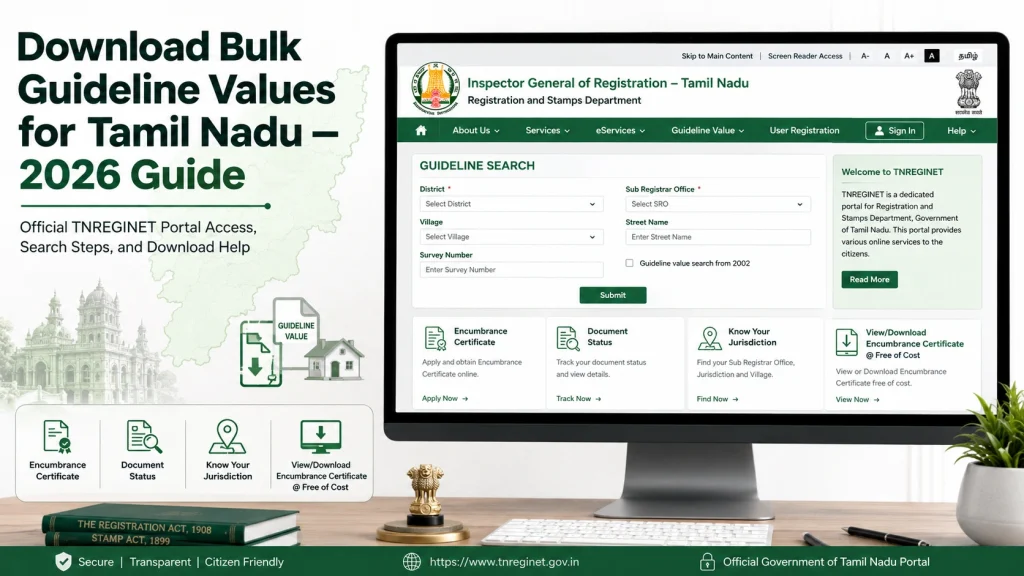
Use Guideline Value Search
On TNREGINET, search for each location one by one.
Record the Values
Save screenshots, notes, or copy the results into a spreadsheet.
Repeat for All Locations
Continue until you have values for each entry.
Method 2: Automation Tools (For Large Lists)
If you need bulk data for dozens or hundreds of areas:
Prepare Your Data List
Create a spreadsheet with required search parameters (district, SRO, street/survey number).
Use a Browser Automation Tool
Tools like iMacros or Selenium can automatically:
Save each result to a local file
Open the guideline value search page
Fill search fields using your spreadsheet entries
Export Results
Use your automation script to output values into a CSV or Excel file for easy analysis.
Be cautious not to overload the portal with too many fast automated requests, as this could trigger blocks.
Table: Bulk Download Planning Template
| District | SRO Office | Search Type | Street/Survey No | Guideline Value (₹/sq ft) |
|---|---|---|---|---|
| Chennai | SRO Central | Street Name | Anna Salai | (to fill) |
| Coimbatore | SRO RS Puram | Survey Number | 45/12 | (to fill) |
| Madurai | SRO Madurai North | Street Name | Bye Pass Rd | (to fill) |
| Salem | SRO Salem | Survey Number | 87/3 | (to fill) |
| Tiruchirappalli | SRO Trichy South | Street Name | Thillai Nagar | (to fill) |
Use this as a working sheet to fill values as you gather them.
Tips for Bulk Guideline Value Downloads
Troubleshooting Common Problems
| Issue | Possible Cause | Solution |
|---|---|---|
| Blank or no results | Wrong details entered | Double‑check district, SRO, and search parameters |
| Portal slow or unresponsive | Server load or browser issue | Try again in off‑peak hours, clear cache |
| Automation script fails | Script errors or portal layout changes | Update script or slow down automated requests |
| Data mismatches | Search fields misaligned | Review your spreadsheet and correct entries |
| Blocked access by portal | Too many rapid requests | Slow down, add delays between automated searches |
FAQs
Final Words
Downloading bulk guideline values for Tamil Nadu is possible with a bit of organization, the right tools, and careful steps. While the portal doesn’t offer one‑click bulk export, you can build your own dataset with manual methods or automation. This helps you analyze rates, plan transactions, and stay organized when dealing with multiple areas.
Just remember to check the official guideline value results carefully, record them accurately, and respect the portal’s usage limits to avoid blocks or errors.