How to Search EC on TNREGINET by Survey Number Update 2026
If you want to check an Encumbrance Certificate (EC) in Tamil Nadu, searching by survey number is often one of the easiest ways to find the right property record, especially for land, plots, and places where the address is not very clear. TNREGINET includes Search/View EC as one of its main online services, and current guides show that the EC search screen lets users search using property details such as survey number, location, and date range.
This method is useful because a survey number identifies the land more directly than a name or loose address. It can help you review registered property transactions before buying, selling, applying for a loan, or checking past records.
How to Search EC on TNREGINET by Survey Number
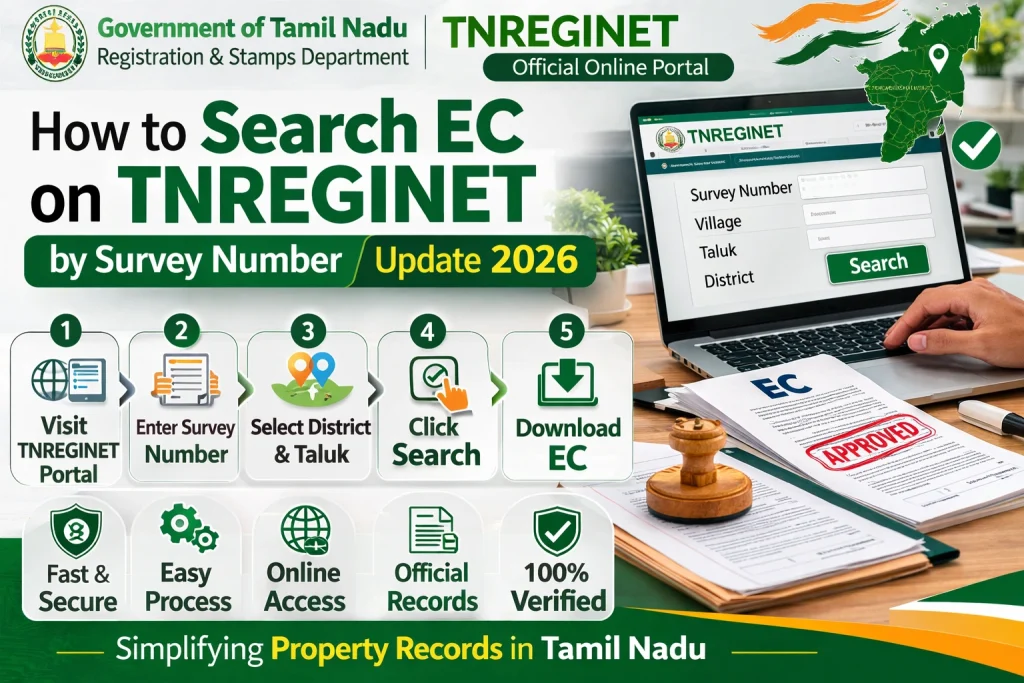
To search EC on TNREGINET by survey number, open the TNREGINET portal, go to E-Services, choose Encumbrance Certificate, click View EC, select the Survey Number option, then enter the required land details like zone, district, village, survey number, and the search period. After that, click Search to view the encumbrance details.
What is an EC on TNREGINET?
An Encumbrance Certificate shows the registered transaction history of a property for a selected period. It can include details such as sale deeds, mortgages, gift deeds, leases, and other registered transactions linked to the property. It is commonly used during property purchase, legal verification, and home-loan processing.
You can also read: TNREGINET EC Shows No Records? Fix It Fast Update 2026
Why search EC by survey number?
Searching by survey number is helpful when the property is better known by land record details than by street address. Current property guides note that this works especially well for rural land, open plots, and undeveloped property, where address-based search may be less accurate.
It also reduces the chance of mixing your property with another one that has a similar owner name or nearby address. In many cases, the survey number gives a cleaner result than a broad name-based search.
Details you should keep ready
Before you start, keep these details with you:
A small tip: keep a copy of the sale deed or older property paper open while searching. It helps you enter the land details exactly as recorded.
Step-by-step: How to search EC on TNREGINET by survey number
Step 1: Open the TNREGINET portal
Go to the official TNREGINET portal. The homepage includes Search/View EC among its quick-search services.
Step 2: Go to Encumbrance Certificate
Open the E-Services section and choose Encumbrance Certificate. Then click View EC to open the search screen. This is the standard flow described in current TNREGINET walkthroughs.
Step 3: Select the Survey Number option
On the EC search screen, choose the option to search by Survey Number. This is the part many users miss because they go ahead with the default option instead of selecting the right search type.
Step 4: Enter the location details
Now fill in the required property details carefully. These usually include:
Enter the numbers exactly as they appear in your property document. If your land has a sub-division, include that too when the form asks for it.
Step 5: Choose the search period
Enter the start date and end date for the period you want to check. This matters because the EC result is shown only for the selected date range.
If you are checking property before purchase, it is safer to choose a wider period instead of a very short one.
Step 6: Click Search
After filling in all the details, click Search. The system will show the property’s encumbrance details, including past registered transactions available for the selected period.
What the result usually means
When the search works, you may see one of two common outcomes:
EC with entries: this means registered transactions were found for the selected period.
Nil EC / no transactions: this means no registered encumbrances were found in the selected period.
A quick note: a Nil EC does not automatically prove complete ownership by itself. It only tells you that no registered encumbrances were found for that chosen period. For full due diligence, the EC should be checked along with land records such as Patta/Chitta.
Common problems while searching by survey number
Wrong survey number
If the survey number is entered incorrectly, the result may show no record or the wrong property. Some current TNREGINET-focused guides point out that incorrect survey details can block proper EC search and property verification.
Wrong village or district
Even when the survey number is right, the result can fail if the district or village does not match the record exactly. Survey-number searches depend on the full land-location combination, not just the number alone.
Narrow date range
If your search period is too short, older transactions may not appear. Widening the date range often helps.
Confusing EC with ownership proof
EC is important, but it is not the same as revenue ownership records. The Tamil Nadu e-services portal separately provides Patta / Chitta / FMB access, which is useful for checking ownership and land classification details alongside the EC.
Best tips for getting the right EC result
Here are a few simple tips that help:
Use the exact survey number from your deed or land document.
Double-check the village and district before clicking search.
Use a wider date range if you are checking old property history.
Cross-check the result with Patta/Chitta records for better safety.
If the result still looks wrong, confirm whether the survey number or property details have changed after subdivision or mutation.
When survey number search is the best option
Survey-number search is usually the better choice when:
Should you also check Patta or Chitta?
Yes, that is a smart move. TNREGINET helps with registration and encumbrance records, while the Tamil Nadu land-record portal provides Patta / Chitta / FMB services. For property due diligence, both are useful because one checks registered transactions and the other helps confirm land ownership and record details.
FAQs
Final Words
Searching EC on TNREGINET by survey number is a practical way to check land-related property records in Tamil Nadu. It works especially well for plots and land parcels where address-based search may be weak. The best approach is simple: keep the exact land details ready, choose the Survey Number option carefully, use the correct date range, and cross-check the result with Patta/Chitta before making any property decision.