How to Check Street Guideline Value on TNREGINET Update 2026
If you want to know the government property value for a specific road or locality in Tamil Nadu, the easiest way is to use the Street option in TNREGINET. This is useful when the property is in a developed area and you know the street name, but you may not know the exact survey number. The official TNREGINET portal provides this option directly on the homepage under Guideline Search.
Quick Check
To check street guideline value on TNREGINET, open the official portal, go to Guideline Search, choose Street, and then enter the District, Sub Registrar Office, Village, and Street Name. Submit the form and review the result carefully. TNREGINET says the guideline-value search is available from 2002.
You can also read: TNREGINET Composite Value for Flats Explained Update (2026)
What is street guideline value?
Street guideline value is the government-fixed benchmark value for property on a particular street or road in a specific area. It is used during property registration and helps buyers and sellers understand the official value attached to that location. ClearTax describes guideline value as the state-fixed minimum value below which property cannot normally be registered in that area.
When should you use street search?
Street search works best when the property is in a developed layout, colony, town, or city area where the road name is clearly known. Housing and ClearTax both explain that in Tamil Nadu, guideline value is generally fixed street-wise in developed areas and survey-number-wise for lands or properties that are not formed into streets.
What details should you keep ready?
Before starting, keep these details ready:
These match the fields shown on the official TNREGINET guideline-search form.
How to check street guideline value on TNREGINET
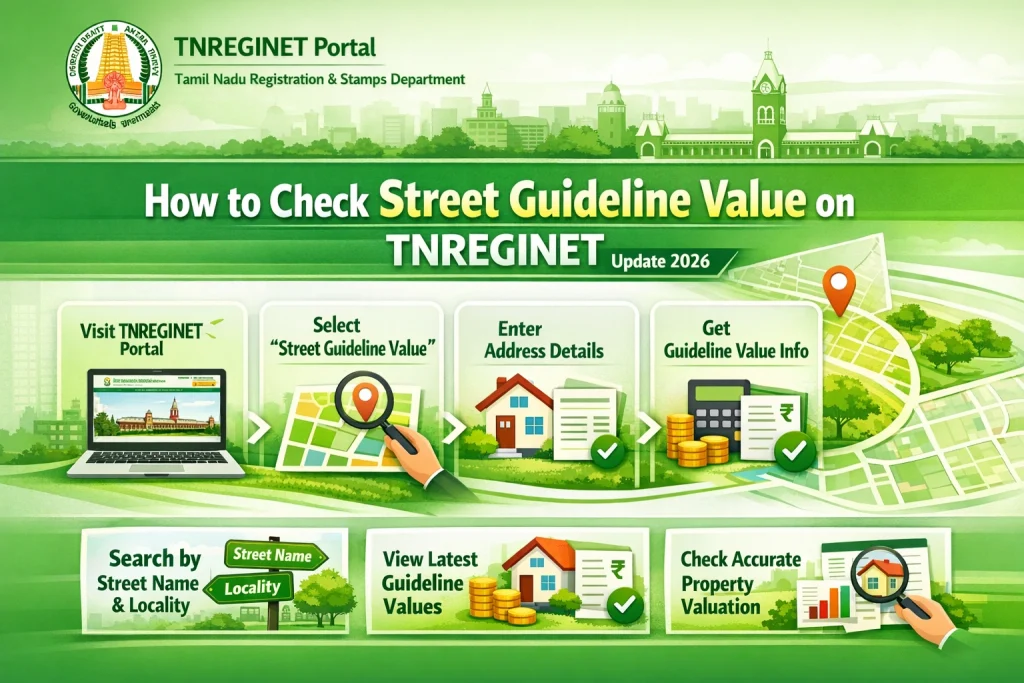
Step 1: Open the official TNREGINET website
- Go to the official Tamil Nadu Registration Department portal. The homepage itself shows the Guideline Search section, so you do not need to depend on unofficial tools or old screenshots.
Step 2: Choose the “Street” option
- Under Guideline Search, select Street instead of Survey Number. This tells the portal that you want to search by road or street name, not by land-survey details.
Step 3: Select the district
- Choose the correct district first. The portal uses district selection to narrow down the correct registration offices and villages.
Step 4: Choose the correct Sub Registrar Office
- Now select the right Sub Registrar Office. This part matters a lot. If the wrong SRO is chosen, the street result may not appear even if the street name is correct. TNREGINET also provides Know Your Jurisdiction on the homepage for this reason.
Step 5: Select the village
- After choosing the SRO, select the correct village. In TNREGINET, village selection is part of the search path for guideline value.
Step 6: Enter the street name carefully
- Type the street name exactly as it is commonly recorded. Small spelling differences can stop the result from showing. If you have an old sale deed, keep it open while typing the name.
Step 7: Click Submit and read the result slowly
- After you submit, the portal should display the guideline value for that street based on the selected area details. Housing’s TNREGINET guide says the result page shows the Tamil Nadu guideline value for the street based on the selected zone and registration details.
Why street search is useful
Street search is often easier than survey-number search for apartments, houses, and developed plots because many people know the road or area name but not the exact field details. It is also useful when you want a quick official benchmark before talking to a seller or planning registration costs. Housing says guideline-value information is used for property valuation and registration-related calculations, while its stamp-duty guide notes that charges are applied on the guideline value or consideration value, whichever is higher.
Common problems people face
The most common problems are simple:
These issues come up again and again in the current TNREGINET guides because the search depends heavily on exact local details.
What if the street name gives no result?
If no result appears, do not assume the portal is wrong. First, confirm the correct SRO using Know Your Jurisdiction. Then check the village and spelling again. If the property is a land parcel or not part of a formed street layout, try the Survey Number option instead, because official and major guide pages both distinguish between developed street-based areas and survey-based land searches.
Street search vs survey number search
Use street search when the property is in a clear road-based location like a town layout, colony, or city neighborhood. Use survey-number search when the property is agricultural land, a plot without a clear street structure, or a place where the survey number is more reliable than the address. That is the same distinction described by Housing and ClearTax.
Simple tips that help
Keep the deed in front of you. Do not guess the SRO. Type the street name carefully. If one search does not work, check whether the property is better searched by survey number. Also remember that TNREGINET’s current public guideline search is meant to cover records from 2002 onward, so older memories or old local quotes may not match what you expected to see on screen.
FAQs
Final Words
Checking street guideline value on TNREGINET is simple once you know the right path. Open the official portal, choose Street under Guideline Search, enter the district, SRO, village, and street name carefully, and then review the result slowly. Most mistakes happen because of wrong office details or small spelling issues, not because the tool is hard to use. If you keep the property papers nearby and use the correct search type, the process becomes much easier.