How to Download TNREGINET EC for Multiple Years Update 2026
If you’re looking to download Encumbrance Certificates (ECs) for multiple years from the TNREGINET portal, you may face some limitations, as the portal usually allows downloading ECs for a single year at a time. However, there are workarounds to manage and obtain ECs for several years efficiently. Here’s how you can do it:
Step-by-Step Process to Download EC for Multiple Years
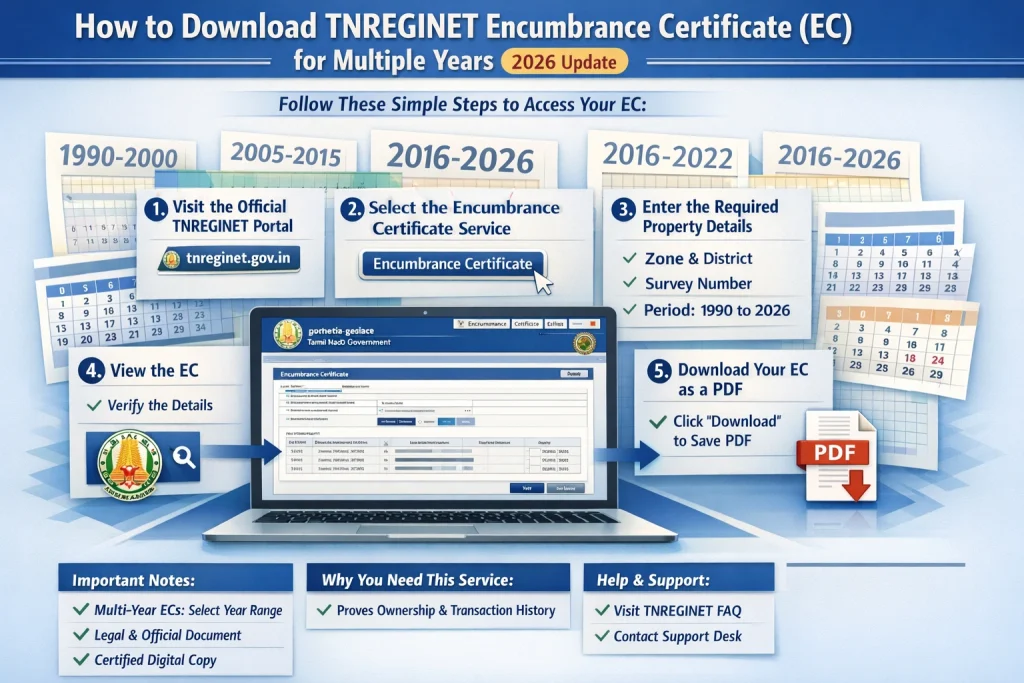
Step 1: Visit the TNREGINET Website
Go to the official TNREGINET portal: https://www.tnreginet.gov.in.
Step 2: Login to Your Account
If you already have an account, enter your Username and Password, and then click Login.
If you don’t have an account, you’ll need to register first by clicking on the “Sign up” option and filling in the necessary details.
Step 3: Access the EC (Encumbrance Certificate) Page
Once logged in, look for the “EC View” option on the homepage or navigate to “Encumbrance Certificate” under the Services section.
Step 4: Select the Property Details
You’ll be asked to provide the Property Details such as:
District
Sub-Registrar Office
Property Type (e.g., land or building)
Survey Number or Document Number
Enter these details carefully to match the records you need.
Step 5: Choose the Date Range for EC
When you are prompted to select a date range for the EC, you will typically need to select a start year and end year.
Note: TNREGINET typically allows you to download EC for one specific year at a time. To access multiple years, you’ll need to manually adjust the start and end dates for each year you require.
Step 6: Download EC for Each Year
After entering the correct dates (e.g., January 1st, 2020 to December 31st, 2020 for the first year), click on the “Submit” or “View” button.
The system will generate the EC for that year, and you will be able to download it in PDF format.
Repeat this process for each year you need the EC for. This is the most reliable method currently available on the portal.
You can also read:What Is the Role of Guideline Value in Property Registration?
Alternative Methods to Download EC for Multiple Years
If you need to download EC for multiple years in bulk, here are some alternative options:
If you need EC for multiple years in one go, you can visit the Sub‑Registrar’s Office where the property was registered. They may offer a way to access bulk ECs for the property. Some offices allow you to request ECs for a range of years at once.
Tip: Carry a printout of your property details (Survey Number, Document Number, etc.) to speed up the process.
In some cases, TNREGINET support may assist you in obtaining ECs for multiple years. Contact their help desk and provide all necessary property details to inquire if this service is available.
Additional Tips for Downloading EC
Use the Correct Property Details: Ensure the details you enter match exactly with the records available in the system to avoid discrepancies or delays.
Clear Cache and Cookies: If the page doesn’t load properly or you encounter issues while downloading, clear your browser’s cache and cookies, and try again.
Check for System Maintenance: Occasionally, TNREGINET undergoes maintenance. If you cannot access the portal, try again after some time.
FAQs
Final Words
Downloading TNREGINET ECs for multiple years can be a bit tricky as the portal currently allows you to download EC for one year at a time. However, by manually adjusting the date range and repeating the process for each year, you can get access to all the records you need.
If you’re looking for bulk ECs or facing issues with the process, don’t hesitate to reach out to TNREGINET support or visit your local Sub‑Registrar Office for assistance.
By following these simple steps, you can easily get the ECs for multiple years, making your property transaction process smooth and efficient.