How to View and Download TNREGINET EC Online Free in 2026
If you are buying land, a house, a flat, or any property in Tamil Nadu, one of the first documents you should check is the Encumbrance Certificate, commonly called EC. This certificate helps you know whether the property has any registered loan, mortgage, sale, gift, settlement, or other legal transaction linked to it.
Earlier, people had to visit the Sub-Registrar Office to check these details. But now, the Tamil Nadu Registration Department allows users to view and download EC online through the TNREGINET portal. The official portal clearly lists “View/Download Encumbrance Certificate @ Free of Cost” as one of its services.
In this guide, I’ll explain in simple words how to view TNREGINET EC online, how to download the EC PDF, what details you need before searching, and what to do if the EC is not showing. This article is written for normal users, property buyers, agents, and first-time visitors who want a clear step-by-step answer without confusing legal terms.
How to View TNREGINET EC Online?
To view TNREGINET EC Online for Free, visit the official TNREGINET portal, go to eServices, select Encumbrance Certificate, and click View EC. Then enter property details such as zone, district, Sub-Registrar Office, village, survey number, subdivision number, and EC period. After submitting the captcha, the EC details will appear if records are available.
You can also read: Find Guideline Value Without Login 2026 – Easy Guide
What Is TNREGINET?
TNREGINET is the official online portal of the Tamil Nadu Registration Department. It helps citizens access property and registration-related services online.
Through TNREGINET, users can:
The official TNREGINET website includes services such as View EC, Guideline Search, Document Status, Certified Copy, and Know Your Jurisdiction.
What Is an Encumbrance Certificate?
An Encumbrance Certificate is a property document that shows registered transactions made on a property during a selected period.
It may show details such as:
In simple words, EC helps you check whether a property is free from registered legal or financial claims.
Why Is EC Important Before Buying Property?
EC is important because it helps you understand the transaction history of a property.
Before buying land, a house, or a flat, EC can help you check:
A clean EC does not always mean the property is 100% risk-free, but it is one of the most important documents to check before buying property.
Can You View and Download TNREGINET EC for Free?
Yes. The official TNREGINET portal mentions “View/Download Encumbrance Certificate @ Free of Cost” on its homepage services section.
But remember one thing: online viewing or downloading is different from applying for a certified copy or other paid registration services. If a bank, court, lawyer, or government office asks for a certified document, you may need to follow the official certified copy process.
Details Needed to Search TNREGINET EC Online
Before you start, keep these details ready:
| Required Detail | Why It Is Needed |
|---|---|
| Zone | To narrow down the property location |
| District | To select the correct area |
| Sub-Registrar Office | To find the correct registration records |
| Village | To match property records |
| Survey Number | Main land identification number |
| Subdivision Number | Used when survey land is divided |
| EC Start Date | From which date you want records |
| EC End Date | Till which date you want records |
| Captcha | To verify user search |
Small mistakes in these details can show wrong results or “No Records Found.”
How to View TNREGINET EC Online in 2026
Follow these steps carefully.
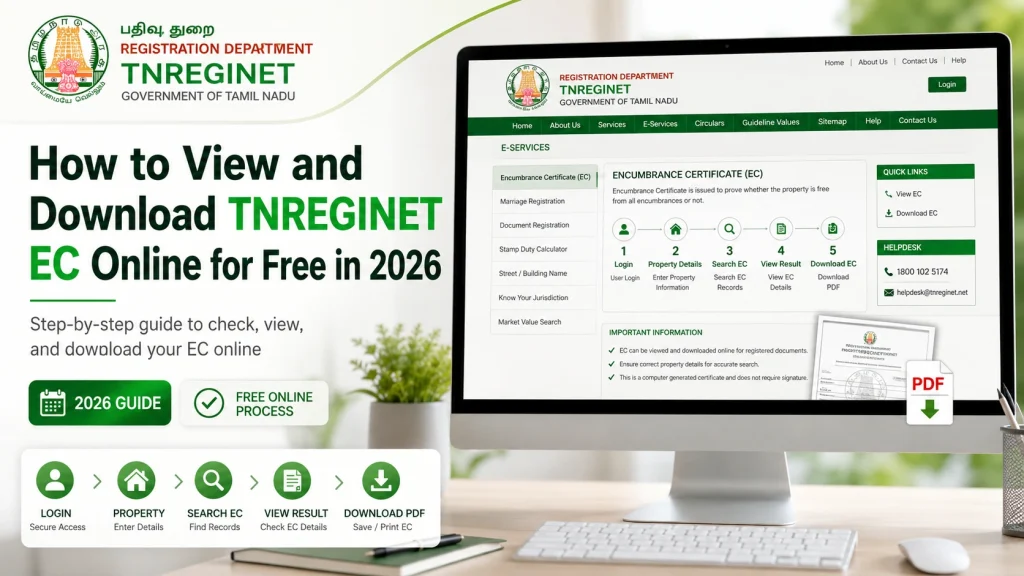
Step 1: Open the Official TNREGINET Website
- Go to the official TNREGINET portal of the Tamil Nadu Registration Department.
- Make sure you are using the official government website, not a third-party page. The official portal is maintained for Tamil Nadu registration-related services and lists EC, guideline value, document status, and other public services.
Step 2: Go to eServices
- On the homepage, look for eServices.
- Under eServices, select:
- Encumbrance Certificate → View EC
- The official portal menu includes Encumbrance Certificate and View EC under eServices.
Step 3: Choose the EC Search Option
- You may see different ways to search EC depending on the portal layout.
- Common search methods include:
- EC search by property details
- Document-wise search
- Plot or flat-wise search
- For most land and house searches, users usually search using property details like district, SRO, village, survey number, and subdivision number.
Step 4: Enter Property Details
- Now enter the required property details.
- You may need to select or type:
- Zone
- District
- Sub-Registrar Office
- Village
- Survey number
- Subdivision number
- EC from date
- EC to date
- Be careful while entering the survey number and subdivision number. For example, 120/1A and 120/1B may refer to different parts of land.
Step 5: Select the EC Period
- Choose the date range for which you want to check the EC.
- For example:
- 1 year EC
- 13 years EC
- 30 years EC
- Custom date range
- For property purchase, many buyers prefer checking a longer period, such as 13 to 30 years, depending on the property age and legal advice.
Step 6: Enter Captcha and Submit
- After filling in the details, enter the captcha shown on the page.
- Then click the search or submit button.
- If the details are correct and records are available, the portal will show the EC result.
Step 7: View EC Details
- The EC result may show details such as:
- Document number
- Year of registration
- Name of parties
- Type of document
- Registration date
- Property details
- Transaction history
- Check the details carefully. Do not only look at the owner name. Also check the document type, year, and property description.
- आप जानकारी डाउनलोड भी कर सकते हैं, अगर आक इसकी जरूरत हो।
How to Download TNREGINET EC PDF Online
After the EC result appears, look for the download or print option.
To download:
Example file name:
EC-Survey-120-1A-Chennai-2026.pdf
This makes it easier to find later.
What Is Nil Encumbrance?
Nil Encumbrance means no registered encumbrance was found for the selected property and selected time period.
In simple words, it means the portal did not find any registered loan, mortgage, sale, or legal claim during the period you searched.
But be careful. Nil Encumbrance does not always mean:
It only means no registered encumbrance was found for the selected period and details.
Online EC vs Certified EC: What Is the Difference?
| Point | Online EC | Certified EC |
|---|---|---|
| Access | Downloaded online | Issued through official certified process |
| Use | Basic checking, buyer review | Legal, bank, official use |
| Speed | Usually faster | May take more time |
| Cost | View/download may be free | Charges may apply depending on service |
| Best For | Initial property verification | Final legal or loan documentation |
For buying property, you can first check online EC. But before final payment or registration, it is better to ask a lawyer or bank whether they need a certified EC.
Common TNREGINET EC Problems and Fixes
TNREGINET EC Not Showing
This is one of the most common problems.
Possible reasons:
What to Do
Try searching again with corrected details. If you still cannot find the EC, visit or contact the concerned Sub-Registrar Office.
“No Records Found” in TNREGINET EC
“No Records Found” does not always mean the property is problem-free.
It may happen because:
Tip
Try searching using both survey number and document number if you have the registered document details.
TNREGINET Website Not Loading
Sometimes the portal may load slowly.
Possible reasons:
Quick Fix
Use Chrome or Edge, clear browser cache, and try again during non-peak hours.
EC PDF Not Downloading
If the EC PDF is not downloading:
Sometimes the issue is not with the EC but with browser settings.
Wrong Details Showing in EC
If the EC shows wrong or confusing details, do not ignore it.
Possible reasons:
What to Do
Compare the EC with the sale deed, parent document, patta, and field measurement details. For serious issues, consult a document writer, legal expert, or Sub-Registrar Office.
Tips Before Downloading TNREGINET EC
Here are some practical tips:
These simple steps can save you from big property problems later.
TNREGINET EC Search by Survey Number
Survey number search is useful for land and individual plots.
You need:
This method is helpful when you do not have the document number but know the land details.
TNREGINET EC Search by Document Number
Document number search is useful when you already have a sale deed or registered document.
You need:
This method can be more direct if you are checking a specific sale deed, mortgage deed, or settlement deed.
Difference Between EC and Patta
Many people confuse EC and Patta. Both are important, but they are not the same.
| EC | Patta |
|---|---|
| Shows registered property transactions | Shows revenue ownership record |
| Issued by Registration Department | Issued by Revenue Department |
| Shows sale, mortgage, gift, settlement | Shows landholder details |
| Useful for transaction history | Useful for land ownership/revenue records |
| Needed for property verification | Needed for land record verification |
For safer property checking, you should verify both EC and Patta.
Difference Between Guideline Value and Market Value
TNREGINET also provides guideline value search. The official portal includes Guideline Search by street and survey number.
Guideline Value
Guideline value is the minimum value fixed by the government for property registration in a particular area.
Market Value
Market value is the actual price buyers and sellers agree on.
Market value is often higher than guideline value because it depends on:
So, do not confuse guideline value with real selling price.
How to Check Guideline Value on TNREGINET
To check guideline value:
The official portal provides guideline search options by street and survey number, along with district, SRO, and village fields.
When Should You Check EC?
You should check EC:
Do not wait until the last day of registration. Check EC early.
Is TNREGINET EC Enough for Property Purchase?
TNREGINET EC is very useful, but it should not be the only document you check.
Before buying property, also verify:
EC is one important part of property verification. It is not a full legal opinion.
Who Can Use TNREGINET EC Online?
TNREGINET EC online can be useful for:
Anyone checking Tamil Nadu property records can use this service.
TNREGINET EC Download Checklist
Before downloading EC, check this list:
FAQs
Final Words
TNREGINET has made EC checking much easier for people in Tamil Nadu. You can now view and download Encumbrance Certificate online without standing in long queues at the Sub-Registrar Office.
But while the online EC is helpful, do not treat it as the only proof before buying property. Always compare it with the sale deed, parent documents, patta, guideline value, and legal opinion.
A simple EC check can protect you from property fraud, hidden loans, and ownership disputes. So before you pay advance money for any property, take a few minutes and check the TNREGINET EC online.