How to Fix “No Records Found” on TNREGINET EC Search 2026
If you’re trying to check your Encumbrance Certificate (EC) on the TNREGINET portal and it says “No Records Found,” don’t worry — you’re not alone. A lot of people face this error when the system can’t match the details you entered with land records. In this article, I’ll walk you through simple steps to fix it, explain why it happens, and share quick tips to solve it easily.
What Does “No Records Found” Mean?
When the TNREGINET portal doesn’t find any data for your property search, it often means one of these things:
When this happens, the portal simply shows “No Records Found,” even if the property really exists.
Step-by-Step: How to Fix “No Records Found”
These simple steps can often fix any temporary loading or session problems.
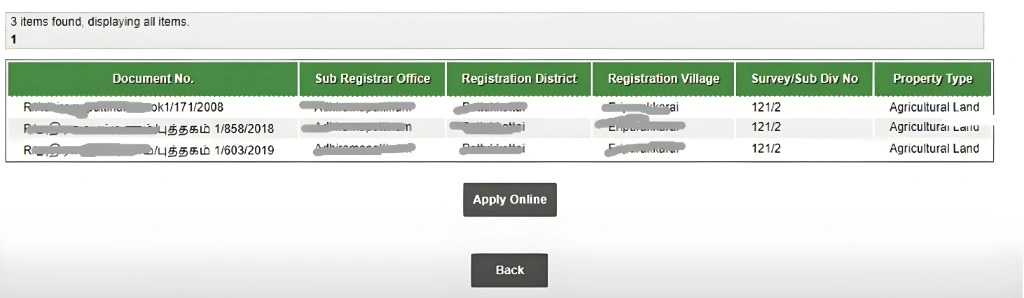
Step 1 — Check Your Details Carefully
Before anything else, make sure the property details are correct:
- Zone
- District
- Sub-Registrar Office (SRO)
- Survey Number
- Sub-Division Number
- Start & End Dates for the EC period
Even one small typo can cause the portal to show no results.
Step 2 — Broaden Your Search Period
If you only search for a short time (like one year), the system might not display records — especially if the transaction happened earlier or outside that range. Try using:
- From: 01-01-1970
- To: Today
This gives the portal more time to look through older records and increases your chances of finding the EC.
Step 3 — Try Both Search Types
TNREGINET has at least two options to search for EC:
- Survey Number Search — best when you know the plot survey numbers
- Document-Wise Search — useful if you have the sale deed number or document number
If one doesn’t work, try the other option — sometimes the records show up under document instead of survey.
Step 4 — Clear Browser Cache or Use Incognito
Technical glitches sometimes block the portal from loading results.
- Clear your browser cache or open TNREGINET in incognito mode
- Try another browser (Chrome, Firefox, Microsoft Edge)
These simple steps can often fix any temporary loading or session problems.
Step 5 — Double-Check with Patta/Chitta
If you can’t find EC at all — even with everything right — check the local Patta/Chitta record online or at the revenue office first. Sometimes survey numbers in TNREGINET don’t match exactly with local records.
How to Ensure Accurate Property Details for TNREGINET Search
If you’re new to TNREGINET or unfamiliar with property documents, it can be confusing to enter the correct details. Here’s a quick guide:
Survey Numbers & Document Numbers – These numbers should be written clearly on your sale deed and other property papers. Always use the official numbers to avoid errors.
Property Type – Different property types (residential, commercial, etc.) may have different records. Make sure you’re searching within the right category.
Local Names and Codes – Sometimes, properties are known by different names locally. If you’re unsure, visit your local Sub-Registrar Office for confirmation.
You can also read: How to Download TNREGINET EC for Real Estate Transactions
What to Do if Records Are Missing Completely
If you still can’t find the EC or relevant property documents after checking everything, it might be because:
The data is not yet available or not updated in the system
There may be issues with the TNREGINET portal itself, like server downtime or system glitches
In such cases, try again after some time. If the issue persists, it’s best to contact the TNREGINET support team for guidance.
Helpful Tips to Avoid Errors
Save Exact Property Details
Before searching, copy your survey number or document number from official papers to avoid typos.
Search Both Survey & Document Wise
If survey search returns nothing, document search often works better if you have the sale deed.
Start with a Wide Date Range
Always begin with at least 30 years. Many property transactions are old, and a narrow period might miss them.
Visit the SRO Office When Needed
If nothing works, visiting the Sub-Registrar’s Office helps — officials can confirm boundaries, survey numbers, and other official data.
Quick Recap (Fix Checklist)
FAQs
Final Words
Seeing “No Records Found” can be confusing, but in most cases it’s just a detail mismatch or a search setting issue. With the right inputs and a bit of patience, you’ll be able to find the Encumbrance Certificate you need — and be confident that your property has a clear legal history.
If you want, I can also help you create step-by-step screenshots, FAQs, or a video script to improve your blog rankings even more!