Top Reasons Why Your TNREGINET EC Might Be Delayed (2026)
The TNREGINET portal allows property owners, buyers, and legal professionals in Tamil Nadu to view and download Encumbrance Certificates (ECs) efficiently. However, many users experience delays, which can be frustrating — especially when dealing with property purchases, loans, or legal verification.
Understanding the common reasons for EC delays can help you prevent them or resolve issues faster. Here’s a detailed guide for buyers, sellers, and NRIs.
Incorrect Property Details Entered During EC Application
One of the most common reasons EC requests get delayed is incorrect information entered in the application form. This includes:
If the system cannot match the details with the registered records, your request may be stuck or rejected, leading to delay.
Tip: Always cross-check property details with the sale deed, parent deed, patta, or A-Register extract before applying.
You can also read: Can You Access TNREGINET From Outside India? Guide for NRIs
High Portal Traffic or Server Load Delays EC Processing
TNREGINET is widely used across Tamil Nadu, especially during property buying seasons, end-of-financial-year transactions, and bank loan processing periods. Heavy portal traffic can lead to:
Tip: Try submitting your EC application during off-peak hours (early mornings or late evenings) for faster processing.
Pending Manual Verification at the Sub-Registrar Office (SRO)
Even for online applications, some ECs require SRO verification, particularly:
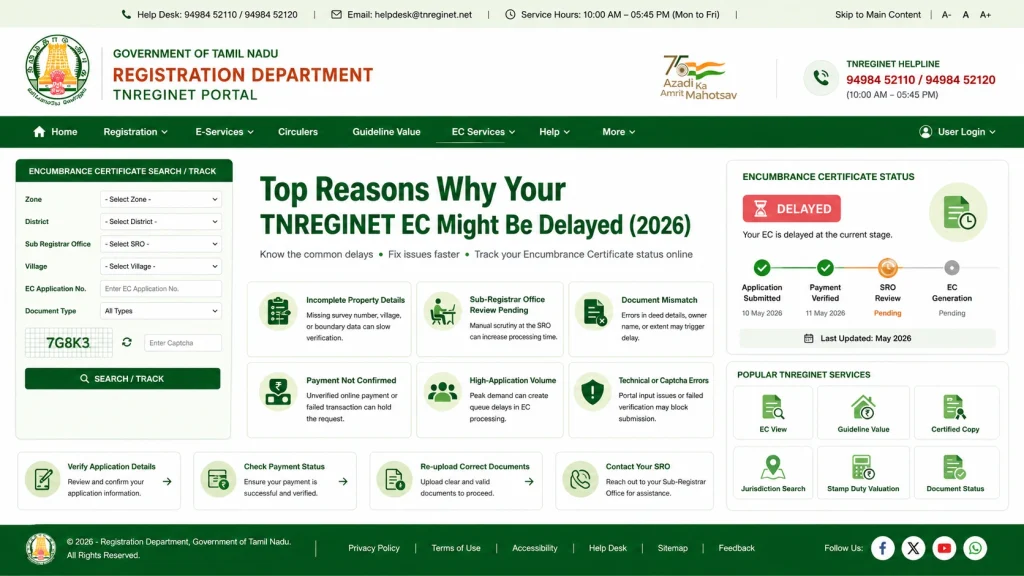
If the SRO has a backlog or verification is pending, your EC may be delayed. Some offices process hundreds of EC requests daily, which can take several days.
Tip: If your EC is delayed for more than a week, contact the relevant SRO directly to confirm pending verification.
Payment Failures or E-Payment Issues
A common reason for delayed ECs is unsuccessful e-payment. EC fees are usually small, but failed transactions can occur due to:
If payment is not confirmed, the EC request cannot proceed, causing a delay in issuance.
Tip: Always keep the payment reference number or CIN for tracking and re-try the payment if necessary.
Old Property Records or Manual Documentation
ECs for properties with older transactions may require manual verification, especially for:
This can add extra processing time since SRO officials may need to physically verify older documents.
Tip: For older properties, consider applying for a certified copy at the SRO to ensure accuracy.
OTP or Login Verification Problems
TNREGINET uses OTP (One-Time Password) verification for login and security. Delays can occur if:
Without OTP verification, the EC application cannot be processed, resulting in delays.
Tip: NRIs can appoint a trusted local representative or use an Indian mobile number to complete verification.
Incorrect Date Range or EC Period Selection
Another overlooked cause is selecting a short or incorrect date range for EC generation.
If your EC request only covers a few years, older encumbrances may not appear, and the SRO may flag the application for further review.
Misaligned dates can also confuse the system, delaying EC issuance.
Tip: Always select a longer period (10–13 years or more) for property verification, especially when buying or selling.
System or Technical Maintenance Delays
Sometimes, delays are beyond your control:
Tip: Check for official maintenance notifications on the TNREGINET portal and try again later.
FAQs
Final Words
lays in TNREGINET EC processing are usually caused by:
Incorrect property details
Pending SRO verification
High portal traffic
Payment failures
Old or manual records
OTP or login issues
Technical maintenance
To minimize delays:
Enter property details carefully
Ensure payments are completed successfully
Apply during off-peak hours
Contact the SRO if verification is pending
Prepare all documents in advance, including old deeds or patta records
By understanding these causes and taking proactive steps, you can ensure a faster, smoother EC process and avoid unnecessary frustration during property transactions in Tamil Nadu.