How to Use TNREGINET EC Search for Flats and Apartments 2026
If you’re planning to buy a flat or an apartment in Tamil Nadu, one of the most important documents you’ll need is the Encumbrance Certificate (EC). The EC proves that the property has a clean legal title and is free from any legal liabilities or disputes. With the TNREGINET portal, you can easily search for the EC of any flat or apartment in Tamil Nadu.
Here’s how you can use TNREGINET EC Search to check the EC of a flat or apartment:
Why is EC Important for Flats and Apartments?
The Encumbrance Certificate (EC) is required by buyers and banks alike before proceeding with property transactions. It helps:
For flats and apartments, it’s especially important to ensure that the developer or builder does not have any legal encumbrances or unpaid loans tied to the property.
You can also read: How to Check TNREGINET Request Status Online Update (2026)
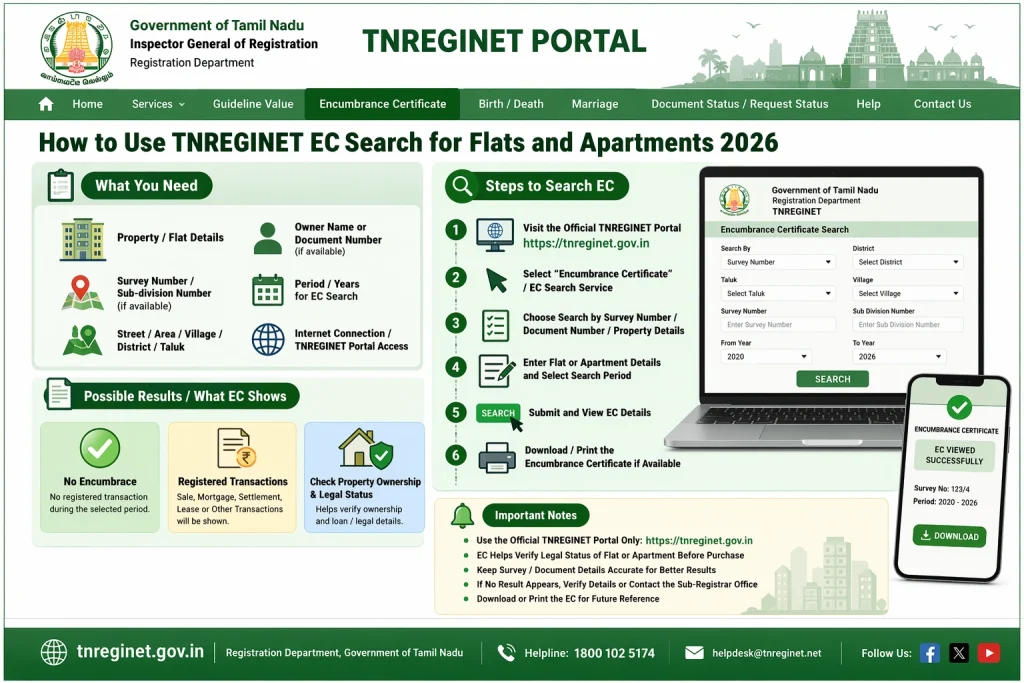
Steps to Perform an EC Search for Flats and Apartments on TNREGINET
Follow these steps to search for the Encumbrance Certificate of a flat or apartment:
Step 1: Visit the TNREGINET Portal
Go to the official TNREGINET portal at https://tnreginet.gov.in.
Step 2: Login to Your Account
If you don’t have an account, you will need to register by providing basic details like your name, contact number, and email address. If you already have an account, simply log in using your username and password.
Step 3: Navigate to the EC Search Section
Once you’re logged in, look for the “Encumbrance Certificate (EC) Search” option on the portal. It’s usually under the “Search for EC” or “Property Search” section.
Step 4: Enter Property Details
o search for the EC of a flat or apartment, you’ll need to enter the following details:
- Property type (e.g., flat, apartment, plot)
- Survey number or Document number
- Registration district
- Year of registration
These details are essential to fetch the correct EC for the flat or apartment you are interested in. The survey number can usually be found in the property documents or can be obtained from the builder or developer.
Step 5: View EC Details
Once you’ve entered the property details, click on Submit or Search. The portal will retrieve the EC for the selected flat or apartment. You can view the EC details online, which will show the ownership and any legal encumbrances, if present.
Step 6: Download the EC
If the EC is available and matches your requirements, you can download it directly from the portal. The certificate will be digitally signed and legally valid for your property transactions.
What to Do if You Can’t Find the EC of a Flat or Apartment
Sometimes, the EC may not be available on the TNREGINET portal due to various reasons such as:
In such cases, here’s what you can do:
Common Issues Faced During EC Search for Flats and Apartments
Here are some common issues people face while using TNREGINET for EC search and how to resolve them:
Incorrect or missing property details
Ensure the survey number and registration details are accurate. Any mistake can lead to errors in the EC search results.
No EC available
If the property is new or hasn’t been registered yet, the EC may not be available on TNREGINET. In this case, consult the builder or check with the sub-registrar’s office.
Server delays
Sometimes, the TNREGINET portal can be slow due to high traffic. If the page doesn’t load or takes too long, try again after a while.
Why You Should Always Check EC for Flats and Apartments
Ensure a clear title: Verifying the EC ensures the flat or apartment has a clean title and is free from any disputes or encumbrances.
Avoid future complications: Checking the EC beforehand prevents future complications when buying the property or applying for a home loan.
Peace of mind: It provides peace of mind knowing that your investment is legally sound and secure.
FAQs
Final Words
Using the TNREGINET EC Search feature for flats and apartments is an easy way to ensure that the property you’re interested in is free of legal encumbrances. By following the steps outlined in this guide, you can quickly find and download the EC, helping you make informed decisions while buying property in Tamil Nadu.
If you encounter any issues during the search, be sure to verify the property details or contact the builder or sub-registrar’s office for further support.