Tracking Your EC Application Status on TNREGINET Update 2026
If you’ve applied for an Encumbrance Certificate (EC) through the TNREGINET portal, you may be eager to track its status. The TNREGINET system makes it easy to keep an eye on your application progress so that you can stay updated about when it will be ready for download. In this article, we’ll walk you through how to track your EC application status step by step.
What is an Encumbrance Certificate (EC)?
An Encumbrance Certificate (EC) is a vital legal document that shows the history of a property’s ownership and any claims or mortgages on it. It’s an important document needed for property transactions, loans, and legal purposes. Applying for an EC online through TNREGINET makes the process much faster and more convenient.
You can also read:How Guideline Value Affects Property Prices in TNREGINET 2026
Why Should You Track Your EC Application Status?
After submitting your EC application, it’s essential to track the status for several reasons:
Stay informed: Know if your application is under process, approved, or rejected.
Save time: Avoid unnecessary visits to the sub-registrar office if the application is still under review.
Know when to collect: Get notified when your EC is ready for download.
How to Track Your EC Application Status on TNREGINET
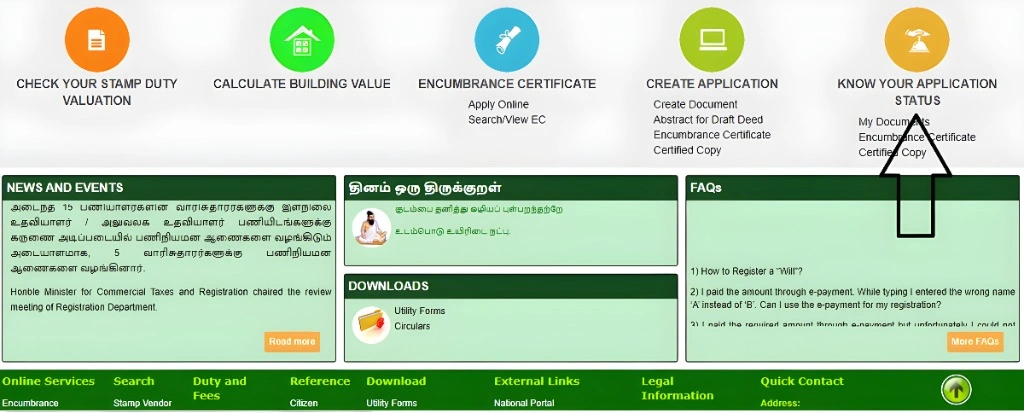
Here’s a step-by-step guide to help you track your EC application status:
Step 1: Visit the TNREGINET Portal
Go to the official TNREGINET website: https://www.tnreginet.gov.in.
Step 2: Navigate to the EC Application Section
On the homepage, look for the “Encumbrance Certificate” section.
Click on “Track EC Application Status”.
Step 3: Enter Application Details
You’ll be prompted to enter some basic details about your application:
- Application Number: This is the unique reference number you received when you submitted the EC request.
- Date of Birth: In some cases, you may also need to enter your date of birth for verification.
Enter the correct details and click “Submit”.
Step 4: View the Status
Once you submit your details, you’ll see the current status of your EC application. Here’s what the status options might mean:
Rejected: There was an issue with your application, and it has been rejected. In this case, you may need to correct the information and apply again.
Under Process: Your EC application is still being processed.
Approved: Your EC application has been approved, and the certificate is ready for download.
Tips to Ensure a Smooth EC Application Status Check
Keep your application number handy: Always note down your application number at the time of submission.
Check regularly: Tracking the status periodically will keep you updated and prevent any last-minute surprises.
Verify entered details: Make sure the application number and any other required details are entered correctly to avoid errors.
Common Problems While Tracking EC Application Status
If the portal shows that your application is not found, this could be due to:
Incorrect application number or details.
A delay in the system processing your request.
Solution: Double-check the application number and try again after a few hours.
If your application is rejected, it could be due to missing or incorrect documents. You might need to submit additional information or rectify the mistakes.
Solution: Check with the Sub-Registrar Office or your local TNREGINET helpdesk for guidance on how to proceed.
How Long Does It Take for EC to Be Processed?
Typically, the processing time for an EC application on TNREGINET is around 7 to 10 working days. However, this may vary based on the complexity of the request and the workload of the Sub-Registrar Office. Always track your application status for the most accurate updates.
FAQs
Final Words
Tracking your EC application status on TNREGINET is easy and can save you time and effort in the property registration process. By following the steps above and staying updated on the status, you’ll know exactly when your EC is ready. If you face any issues or delays, remember that you can always contact the TNREGINET helpdesk or visit your local Sub-Registrar Office for assistance.