How to Find Village Code on TNREGINET (Step-by-Step Guide)
If you are using the TNREGINET portal, you will often see a field for Village, but sometimes also Village Code, especially when searching property details, Encumbrance Certificates (EC), guideline values, or land records.
In this guide, I will show you exactly how to find your village code so your property searches work smoothly.
What Is a Village Code and Why You Need It
What Is a Village Code and Why You Need It
When you use TNREGINET to search property, EC view, or guideline value, you may have to choose District, Taluk or Zone, Sub-Registrar Office (SRO), and Village or Village Code.
Many users get errors because the village name or code is not correct, and TNREGINET search will not return results. The system expects official values, not just any village name.
The village code is simply the numeric or system-aligned code that matches the village or revenue area in the official government database.
You can also read: TNREGINET Property Registration Services Guide Update (2026)
How to Find Village Code
Below are the steps that actually work when searching TNREGINET:
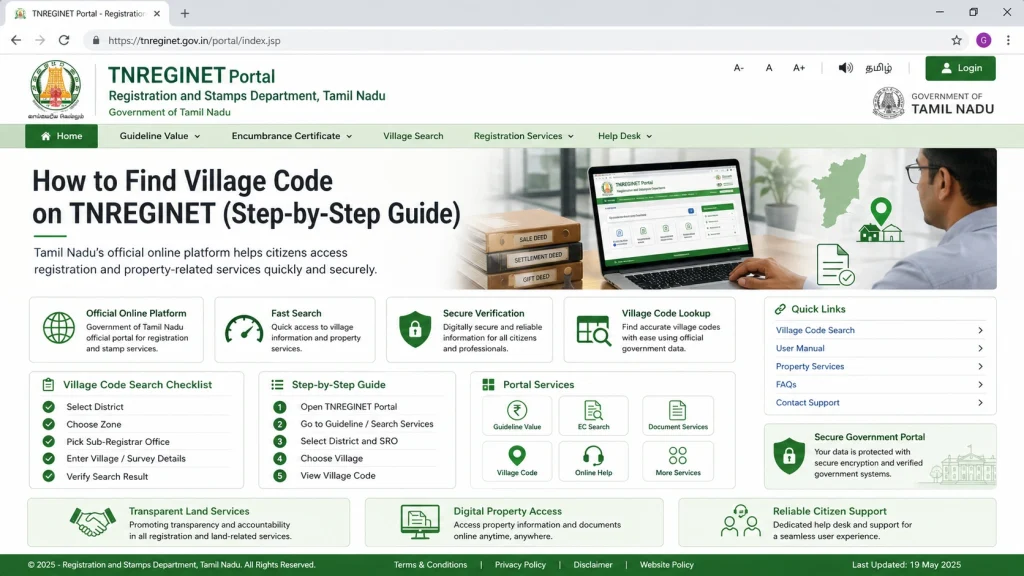
Go to the Official Portal
Open the TNREGINET portal in your browser. If the site opens in Tamil, switch to English.
Choose the Service You Need
Most village code searches are needed when you are searching for Encumbrance Certificate (EC), Guideline Value, or Document Search. Pick whichever service you are using first.
When You See the Village Dropdown
You will notice a field labeled Village, sometimes with a small code next to it. This list is linked to the official village list used by TNREGINET. Do not try typing random text, select from the dropdown list.
Scroll the Village List
Once you select District, Sub Registrar Office, and Taluk or Zone, the Village field populates with all official villages for that region. This ensures you get the correct village code automatically.
Think of it like this: TNREGINET already knows the village codes. It just expects you to pick the right one from its list. That is why manual typing often fails.
What if My Village Does Not Appear
Sometimes you might not see your expected village name because old or new administrative names, the property might fall under a different revenue or revenue block area, or the TNREGINET database may categorize it differently.
Here is what to do:
Quick Tip: Use Census or Revenue Lists
If the portal dropdown still does not help, you can use Tamil Nadu village code directories which match the official village codes used by government systems outside of TNREGINET. These often match or help you guess the TNREGINET code.
Common Errors to Avoid When Searching Village Code
Tools and Tricks for Easy Searches
FAQs
Final Words
Finding the correct village code on TNREGINET does not have to be confusing. By following the dropdown selection and cross-checking with your Patta or sale deed, you can save time and avoid errors. Remember, the portal is strict about official entries, so always double-check your Taluk, SRO, and Village before searching.
With these tips, you will be able to get your ECs, guideline values, and document downloads without frustration. A little preparation makes the whole TNREGINET experience much smoother.