TNREGINET EC Search by Document Number Update 2026
If you already have the document number of a property, checking the Encumbrance Certificate on TNREGINET becomes much easier. This method is useful when you want to verify a past sale deed, mortgage entry, settlement, or other registered transaction without depending only on survey details or a full property description. TNREGINET is the Tamil Nadu Registration Department’s official portal, and it clearly offers Search/View EC and View/Download Encumbrance Certificate @ Free of Cost on its public interface.
Quick answer
To do TNREGINET EC search by document number, open the official TNREGINET portal, go to Search/View EC, and use the EC search form with the exact registration details. In practice, the safest way is to keep the document number, registration year, and the correct Sub-Registrar Office (SRO) ready before you start. If you do not know the correct office, use Know Your Jurisdiction first.
What is an EC on TNREGINET?
An Encumbrance Certificate, or EC, is a property record that helps show whether a property had registered transactions or liabilities during a selected period. It is commonly used during property purchase, sale, loan processing, and legal checking. Current TNREGINET explainers and legal-tax guides consistently describe EC as a key document for checking ownership history and recorded transactions.
You can also read: Fixing Blank PDFs in TNREGINET EC Downloads Update 2026
Why search by document number?
Searching by document number is helpful when:
This is also why many broader TNREGINET articles discuss multiple search paths, including EC search and survey-number-based verification. A focused document-number guide is more useful for people who already have registration details in hand.
Details you should keep ready
Before starting, keep these details with you:
Current TNREGINET-related guides consistently point users to the EC search form and note that registration details matter. Housing’s TNREGINET walkthrough says users reach the Search Encumbrance Certificate screen and then fill the required information to continue the search.
Step-by-step: TNREGINET EC search by document number
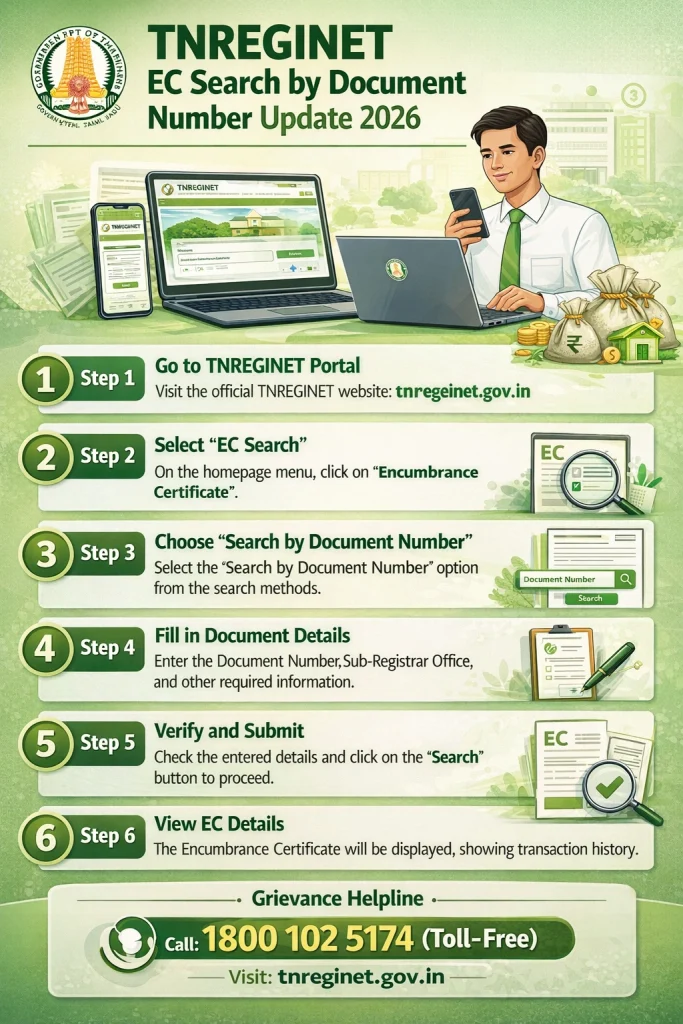
Step 1: Open the official TNREGINET portal
Go to the official TNREGINET website. On the homepage, you will find Search/View EC in the quick search area, and the portal also shows View/Download Encumbrance Certificate @ Free of Cost as a public service.
Step 2: Choose the EC search option
Click Search/View EC or go to the Encumbrance Certificate section and select View EC. Housing’s TNREGINET walkthrough describes this flow as going to E-Services, choosing Encumbrance Certificate, and then clicking View EC.
Step 3: Enter the document details carefully
When the search screen opens, enter the document-based details exactly as shown in your registered deed. Use the same document number, correct year, and correct SRO. If any one of these is wrong, the search may fail or show the wrong result. Current EC search guides around TNREGINET and related property-document search tools repeatedly stress matching the registration details exactly.
Step 4: Check the result slowly
Once the result appears, check:
Do not just look for “record found.” Make sure the actual record matches your property and document. TNREGINET explainers also note that EC results need interpretation, especially when people are checking title history or legal status.
Step 5: Download or save the EC
If the result is correct, save or print the EC for your records. TNREGINET publicly offers EC viewing and downloading as part of its online services.
What if you do not know the correct SRO?
This is one of the biggest reasons users get stuck. The TNREGINET homepage itself highlights Know Your Jurisdiction, which is there for exactly this kind of problem. If you are not sure which Sub-Registrar Office handled the document, check the jurisdiction first before retrying the EC search.
Common problems in TNREGINET EC search by document number
No records found
This usually happens because of one of these reasons:
wrong SRO
wrong document number
wrong registration year
typing error
old record mismatch
using details from a related deed instead of the target deed
Current TNREGINET help-style pages also keep pointing to exact matching of deed details and SRO selection when users see missing results.
Result appears, but it does not match your property
This can happen when a document number is entered correctly but the year or office is wrong. Always cross-check the result with your sale deed or parent document before trusting it.
Apartment records are confusing
For flats and apartments, one document may relate to parent land, another to undivided share, and another to the flat sale. In such cases, document-number search helps, but you may still need to compare multiple documents for a complete picture. Broader TNREGINET articles already discuss how users often need both EC-based and survey-based checks, which is why apartments can be more confusing than standalone plots.
When document number search works better than survey number search
Document number search is usually better when:
Survey number search may be more helpful when you are checking land history without a document copy, especially for plots or rural land. Housing’s current TNREGINET guide separately discusses checking property by survey number, which shows that different search paths suit different user situations.
Simple tips to get the right EC result faster
Use the exact spelling and numbers from the deed. Do not guess the year. Do not assume the nearest SRO is the correct one. Keep the old document in front of you while entering details. If the record still does not appear, use Know Your Jurisdiction and retry once more before concluding that the property has no record.
Is TNREGINET EC search by document number enough before buying property?
It is useful, but not always enough on its own. A careful buyer should also verify the deed copy, the current owner details, and any related property records. Current EC guides describe the EC as an important due-diligence document, but it should be part of a wider property check, not the only step.
FAQs
Final Words
If you already have the deed details, TNREGINET EC search by document number is one of the easiest ways to check a property record in Tamil Nadu. The key is simple: enter the exact document number, the correct year, and the right SRO. Most people fail because they rush this part. If you slow down, match the details carefully, and use Know Your Jurisdiction when needed, the search becomes much easier and more reliable.