Using TNREGINET for Mortgage or Loan Encumbrance Search 2026
When you’re applying for a home loan or mortgage, one of the key documents the bank or financial institution will ask for is the Encumbrance Certificate (EC). This document provides a clear history of any mortgages or legal claims on the property. If you’re dealing with property transactions, TNREGINET makes it easy to conduct an Encumbrance Search to check for any existing mortgages or encumbrances on your property. In this article, we’ll guide you through the process of using TNREGINET for mortgage or loan encumbrance searches.
What is an Encumbrance Certificate (EC)?
An Encumbrance Certificate (EC) is an official document issued by the Registration Department of Tamil Nadu. It provides a record of all transactions related to a property, including ownership transfers and mortgages. The EC shows:
For mortgages and loans, the EC confirms that the property is free from legal liabilities and can be offered as collateral for the loan.
You can also read:Can You Download Multiple EC Records from TNREGINET 2026?
Why Do You Need an EC for Mortgage or Loan?
When applying for a home loan or mortgage, banks and financial institutions require an Encumbrance Certificate to:
Ensure that the property is free of any claims or encumbrances.
Verify ownership history, especially in cases of property disputes.
Confirm that the property can legally be used as collateral for the loan.
If you’re unsure whether the property has any existing mortgages or encumbrances, you can use TNREGINET to search for the EC and ensure the property is legally clear.
Steps to Use TNREGINET for Mortgage or Loan Encumbrance Search
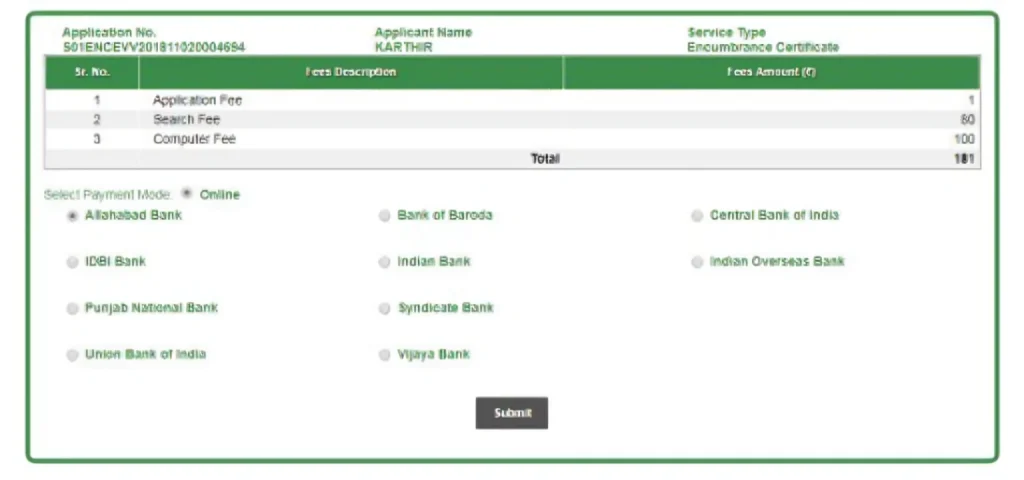
Follow these simple steps to perform a mortgage or loan encumbrance search for your property on TNREGINET:
Step 1: Visit the TNREGINET Portal
Open your browser and go to the official TNREGINET website:
https://www.tnreginet.gov.in
On the homepage, look for the “Encumbrance Certificate” section. This is where you can search for the EC related to mortgages and loan encumbrances.
Step 2: Log in to Your TNREGINET Account
If you have an existing TNREGINET account, log in using your username and password.
If you’re a new user, click on the “Register” button, provide the necessary details (such as email address, mobile number, and address), and create a new account.
Step 3: Select the “Encumbrance Certificate” Option
After logging in, navigate to the “Encumbrance Certificate” section.
Click on “Search/View EC”. This will take you to the page where you can search for mortgages or loan encumbrances on a property.
Step 4: Enter Property Details
To search for the EC, you will need to provide specific property details:
- District Name: Select the district where the property is located.
- Sub-Registrar Office (SRO): Choose the Sub-Registrar Office where the property was registered.
- Village Name: Enter the name of the village or locality where the property is situated.
- Survey Number: This is the unique identifier for the land. Enter the survey number of the property from the sale deed or property document.
For a mortgage or loan encumbrance search, you can also use the document number or transaction number if available.
Step 5: Choose the Date Range
For an encumbrance search related to mortgages or loans, you can select the date range for which you need to check the transaction history.
You can either choose a specific year or a broader range to see all the transactions that have been registered for the property.
Step 6: Submit the Search Request
After entering the required details, click on “Submit” or “Search” to initiate the mortgage or loan encumbrance search.
The system will process the request and display the Encumbrance Certificate if the property is registered under the details provided.
Step 7: View and Download the EC
Once the EC is displayed on the screen, carefully review the information to check for any existing mortgages or encumbrances.
If the EC shows a clean history (no mortgages or claims), the property is free from encumbrances and can be used for a loan.
If you need the document for official use, click the “Download” button to get the EC as a PDF file.
What to Do if You Find a Mortgage or Encumbrance
If you find that the property has an existing mortgage or legal encumbrance, it’s essential to take the following steps:
Verify the details: Check if the encumbrance is related to the current owner or a previous owner.
Resolve issues: If you’re planning to purchase the property, make sure to clear the mortgage or resolve any legal issues with the current owner before proceeding with the transaction.
Consult with a lawyer: If you’re unsure about the legal status, consult with a legal expert or property lawyer to understand the implications of the encumbrance on your loan application.
How to Authenticate the EC for Loan Purposes
For official purposes, such as applying for a loan, you will need a certified EC (authenticated by the Sub-Registrar Office). Here’s how to get the certified EC:
After downloading the EC from TNREGINET, visit the Sub-Registrar Office where the property was registered.
Submit the viewable EC and pay the required certification fee to get the authenticated EC.
The Sub-Registrar Office will verify the details and stamp the EC, making it legally valid for loan or mortgage purposes.
FAQs
Final Words
Using TNREGINET for a mortgage or loan encumbrance search is simple and helps you verify the legal status of a property. By following the steps outlined above, you can quickly check whether the property you are interested in is free from mortgages or legal claims. If you plan to use the property as collateral for a home loan or mortgage, ensure that the EC is certified by the Sub-Registrar Office for official use.