TNREGINET Login or Captcha Errors? Here’s the Fix Update 2026
If you’ve been trying to access the TNREGINET portal for property registration, document verification, or encumbrance certificate (EC) searches, you may have faced login or captcha errors. These errors can be frustrating, especially when you’re in a rush to complete important tasks. Don’t worry! In this article, we’ll go through the most common login and captcha issues and share easy steps to fix them so you can get back to using the portal smoothly.

Common TNREGINET Login Issues
If you can’t log in to TNREGINET, the first thing to check is whether you’ve entered the correct username and password. This might seem obvious, but sometimes a typo or forgotten details can prevent you from logging in.
Fix:
Double-check your login credentials.
Make sure Caps Lock isn’t on and you’re typing everything as intended.
If you’ve forgotten your password, use the Forgot Password option on the login page to reset it.
If you’ve entered incorrect login details multiple times, your account may be temporarily locked for security reasons. This can happen if you’ve made several unsuccessful login attempts.
You can also read:TNREGINET EC View vs Certified EC: What’s the Difference?
Common TNREGINET Captcha Errors
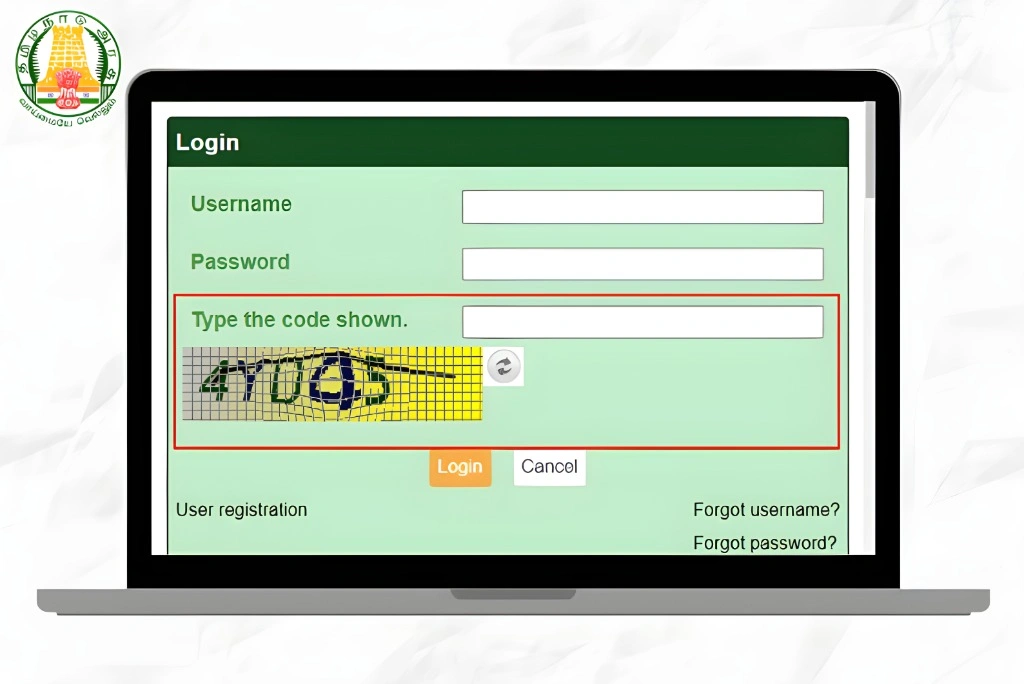
The captcha is there to protect the website from automated bots and ensure that real people are accessing the portal. However, sometimes captcha errors can prevent you from submitting forms or accessing the site.
Captcha Not Loading Properly
Sometimes, the captcha may fail to load correctly, leaving you unable to complete the login or form submission.
Fix:
Clear your browser cache to remove outdated files that might be causing issues.
Refresh the page. This usually reloads the captcha.
Try accessing the portal from a different browser or device.
Incorrect Captcha Input
The captcha can sometimes be hard to read or unclear, leading to incorrect input errors. You might get stuck in a loop where the portal keeps asking you to enter the captcha correctly.
Fix:
Ensure there are no extra spaces or characters in your captcha entry.
Carefully re-enter the captcha code. If the characters are unclear, click on the refresh icon near the captcha box to get a new one.
If the characters are still hard to read, try switching to the audio captcha, which might be easier to understand.
Captcha Expiry
If you take too long to fill out the captcha, it may expire, leading to an error when you submit the form.
Fix:
If you experience a delay, refresh the page to reload the captcha.
Complete the captcha as soon as it loads.
Other Login and Captcha Troubleshooting Tips
Clear Your Browser Cache and Cookies
Sometimes, old data stored in your browser can cause issues with logging in or captcha functionality. Clearing your browser’s cache and cookies can help resolve this.
How to clear your cache and cookies:
Choose all time or a relevant time period, and select Cache and Cookies to clear.
Go to your browser settings (usually found in the upper right corner).
Look for Privacy & Security options.
Select Clear browsing data or Clear cache.
Use a Different Browser or Device
If you continue facing captcha or login issues on one browser, try using another. Some browsers handle TNREGINET’s captcha system better than others. Popular choices include Google Chrome, Mozilla Firefox, or Microsoft Edge.
Alternatively, switch to a different device like a smartphone or tablet to see if the issue persists.
Disable VPN or Proxy Settings
If you’re using a VPN or proxy, TNREGINET may have trouble identifying your connection, causing login or captcha errors.
Fix:
If you don’t want to disable your VPN, try connecting from a different network.
Turn off the VPN or proxy server and try logging in again.
When to Contact TNREGINET Support
If none of the above solutions work and you’re still encountering login or captcha errors, it may be time to contact TNREGINET support. You can reach them through:
Email support: Find the official contact information on the TNREGINET website.
Helpdesk: If you’re in Tamil Nadu, visit your local Sub-Registrar Office for direct assistance.
Phone support: You can also call the TNREGINET helpline to report the issue.
FAQs
Final Words
Login and captcha issues on TNREGINET can be a hassle, but the solutions are often simple. By checking your login credentials, clearing your browser cache, refreshing the captcha, or using a different browser, you can typically resolve most errors quickly. If you continue to face problems, don’t hesitate to reach out to TNREGINET support for further help. Hopefully, with these fixes, you’ll be able to access the portal and complete your property tasks with ease!