Why TNREGINET Search Doesn’t Work for Village Names 2026
If you’ve ever tried searching for property records on the TNREGINET portal and found that the search doesn’t return results for village names, you’re not alone. Many users face this issue, and it can be frustrating when you’re trying to access important documents like Encumbrance Certificates (EC) or property details. In this article, we’ll explain why this happens and what you can do to fix it.
What is TNREGINET?
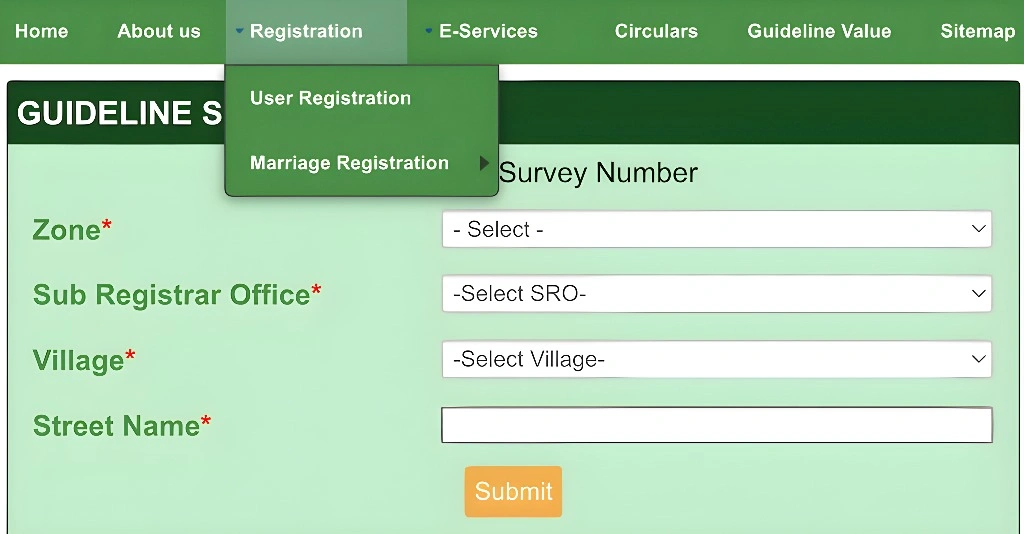
TNREGINET is the official online portal developed by the Registration and Stamps Department of Tamil Nadu. It allows users to check property records, apply for Encumbrance Certificates (EC), view guideline values, and even register property online. To search for property records, users typically need to enter details like the survey number, village name, and sub-registrar office.
You can also read:TNREGINET: Auto-Update EC After New Property Registration?
Why Does TNREGINET Search Not Work for Village Names?
There are several reasons why the TNREGINET search may fail to return results when searching for village names. Let’s take a look at the most common causes and how to address them.
Incorrect or Misspelled Village Names
One of the most common reasons for a failed search is incorrect spelling or formatting issues in the village name. The TNREGINET portal requires exact matches for the village name to return the correct property details. Even small spelling mistakes or extra spaces can prevent the system from finding the right records.
How to fix it:
- Double-check the village name for any spelling errors.
- Ensure there are no extra spaces before or after the name.
- Try using the name as it appears on official documents like the sale deed or title deed.
Tip:
If you’re unsure of the correct spelling, you can check the official land records or consult the local sub-registrar office.
Inaccurate Village Name Formatting
TNREGINET may require the village name to be entered in a specific format. For example, some villages may be written with abbreviations or a particular suffix (like “village” or “pudur”), and entering them without the correct format can lead to a failed search.
How to fix it:
Verify the correct format by cross-checking property documents or asking at the sub-registrar office.
Check the official name of the village, including any suffixes (such as “village,” “pudur,” “town,” etc.).
Non-Digitized or Unavailable Village Records
In some cases, older records for certain villages might not be digitized yet. This means that the TNREGINET portal may not have updated information for those villages, especially in rural or underdeveloped areas.
How to fix it:
You may need to visit the office in person to obtain property information for villages that haven’t been digitized yet.
Check with the local Sub-Registrar Office to see if the records for the village are available offline.
Incorrect Sub-Registrar Office (SRO) Details
Sometimes, the issue is not with the village name itself, but with the incorrect selection of the Sub-Registrar Office (SRO). Each property falls under a specific SRO, and if you enter the wrong SRO or choose the wrong jurisdiction, the search may not yield any results.
How to fix it:
If you’re unsure of the correct SRO, you can use the “Know Your Jurisdiction” feature on the TNREGINET portal to find the right SRO.
Make sure you select the correct Sub-Registrar Office (SRO) for the village.
Database or Technical Issues
At times, technical glitches or temporary issues with the database can affect the TNREGINET search function. This can lead to search errors, including not being able to find records for specific villages.
How to fix it:
You can also try using a different browser or device to see if the issue persists.
Wait and try the search again after some time.
Search Limitations or Restrictions
TNREGINET may impose certain search restrictions based on the volume of data available. Some villages might have multiple subdivisions or multiple names for the same location, making it harder to narrow down the search results accurately.
How to fix it:
If you continue facing difficulties, visit the Sub-Registrar Office for assistance in finding property records.
Try searching with broader criteria, such as using the survey number or property document number.
How to Improve Your TNREGINET Search for Village Names
If you’ve been facing issues with the TNREGINET search for village names, here are a few tips that can improve your chances of success:
Check Official Documents: Cross-check the village name with documents like your sale deed, title deed, or tax receipt.
Use Correct SRO and Date Range: Make sure you’re entering the right Sub-Registrar Office and using the correct date range for the property.
Verify the Village Name Format: Use the official format for the village name as listed on property documents.
Try Broad Search Terms: If the village name doesn’t work, try searching with the survey number, document number, or owner name instead.
Check for System Updates: If the issue persists, check for any maintenance updates on the TNREGINET website, or contact the TNREGINET helpdesk for further assistance.
FAQs
Final Words
If TNREGINET search doesn’t work for your village name, it could be due to spelling errors, incorrect formatting, or digitization issues. By following the tips above and making sure you have the right details, you should be able to improve your chances of a successful search. If the problem persists, don’t hesitate to contact the TNREGINET support team or visit the local Sub-Registrar Office for further help.