TNREGINET SRO Finder – Search EC Correctly Update 2026
When searching for an Encumbrance Certificate (EC) in Tamil Nadu using TNREGINET, selecting the correct Sub-Registrar Office (SRO) is crucial. Many users enter the wrong SRO or district, leading to Nil EC results or errors. Using the TNREGINET SRO Finder ensures you target the correct office and retrieve accurate property records.
This guide explains how to use the SRO Finder step by step, common mistakes to avoid, and tips for a smooth EC search.
What Is an SRO in TNREGINET?
An SRO, or Sub-Registrar Office, is the local government office where property transactions are registered. Each SRO maintains records for specific villages, towns, and survey numbers.
When searching ECs online, selecting the wrong SRO may result in:
The TNREGINET SRO Finder helps identify the correct SRO before starting your EC search.
You can also read: TNREGINET Document Status: Pending to Approved – Update 2026
Why SRO Finder Matters
Using the correct SRO:
Step-by-Step Guide to Use TNREGINET SRO Finder
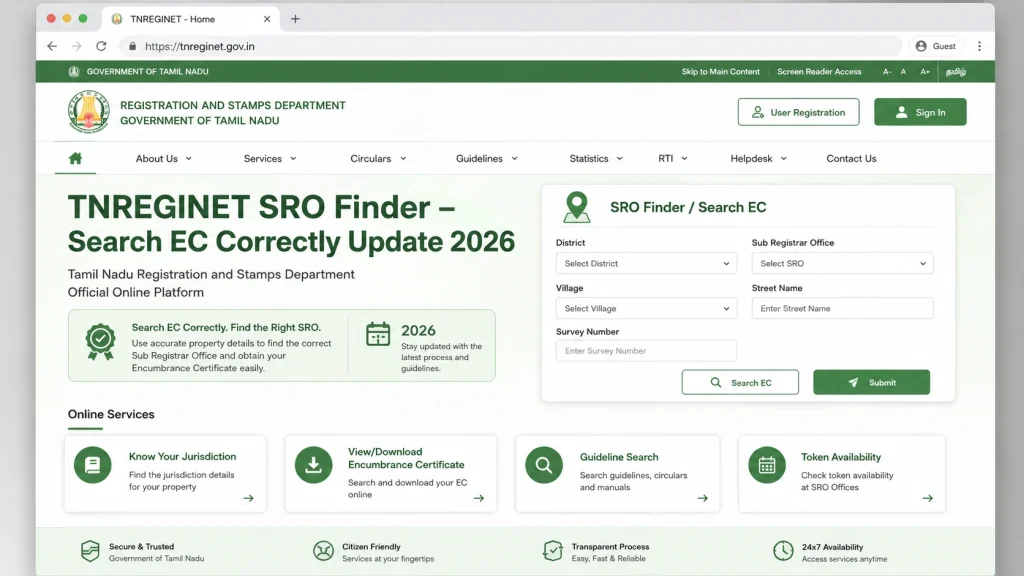
Step 1: Open TNREGINET Portal
Visit the official TNREGINET website.
Step 2: Locate the SRO Finder Tool
Navigate to the Services section and select SRO Finder.
Step 3: Enter Property Details
Fill in the following:
Village or Town
District
Taluk (Sub-District)
Step 4: Search for SRO
Click the Search button. The portal will display the Sub-Registrar Offices covering the selected area.
Step 5: Note the Correct SRO Code
Identify the SRO linked to your property’s survey number or village. This SRO will be used in the EC search form.
How to Search EC Correctly Using SRO Finder
After identifying the correct SRO, follow these steps:
Common Mistakes When Searching EC
| Mistake | Solution |
|---|---|
| Using wrong SRO | Always check SRO using the SRO Finder |
| Short date range | Use a longer search period, at least 13–30 years |
| Wrong survey number | Verify survey number from sale deed or patta |
| Mismatched village name | Confirm the correct village/town in TNREGINET |
| Ignoring payment status | Ensure EC payment is successful before search |
Tips to Ensure Accurate EC Search
Why Accurate EC Search Matters
FAQs
Final Words
The TNREGINET SRO Finder is an essential tool for accurate EC searches. Selecting the correct Sub-Registrar Office prevents errors, avoids Nil EC results, and ensures you retrieve complete property records. Always double-check property details, survey numbers, and village names before starting your EC search. Regular monitoring and correct SRO selection make property verification smooth and reliable.