How to Download TNREGINET EC for Real Estate Transactions
If you’re involved in a real estate transaction in Tamil Nadu, the Encumbrance Certificate (EC) is one of the most important documents you will need. The EC serves as proof that a property is free from legal encumbrances like unpaid loans or legal disputes. It’s a mandatory requirement when buying, selling, or mortgaging a property.
Thanks to the TNREGINET portal, obtaining and downloading an Encumbrance Certificate is a simple and quick process. This guide will walk you through the steps of downloading the EC from TNREGINET for your real estate transaction.
What Is an Encumbrance Certificate (EC)?
An Encumbrance Certificate (EC) is a legal document that provides a record of all property transactions, such as:
This document is essential for property verification and proves that the property in question has no outstanding financial obligations or legal disputes. Banks often require a certified EC when applying for a home loan or mortgage.
Why Do You Need to Download the EC for Real Estate Transactions?
A certified EC is essential for:
Verification of Ownership: It proves the ownership history and legal standing of the property.
Mortgage or Loan Application: Banks and financial institutions require an EC to verify the property’s legal status before granting a loan.
Transfer of Property: During property transactions (buying/selling), the EC is used to ensure the property is free from encumbrances or disputes.
Legal Clearances: It is used in property litigation and legal disputes to verify if the property is legally clear.
How to Download the EC from TNREGINET
Follow these simple steps to download the Encumbrance Certificate from the TNREGINET portal:
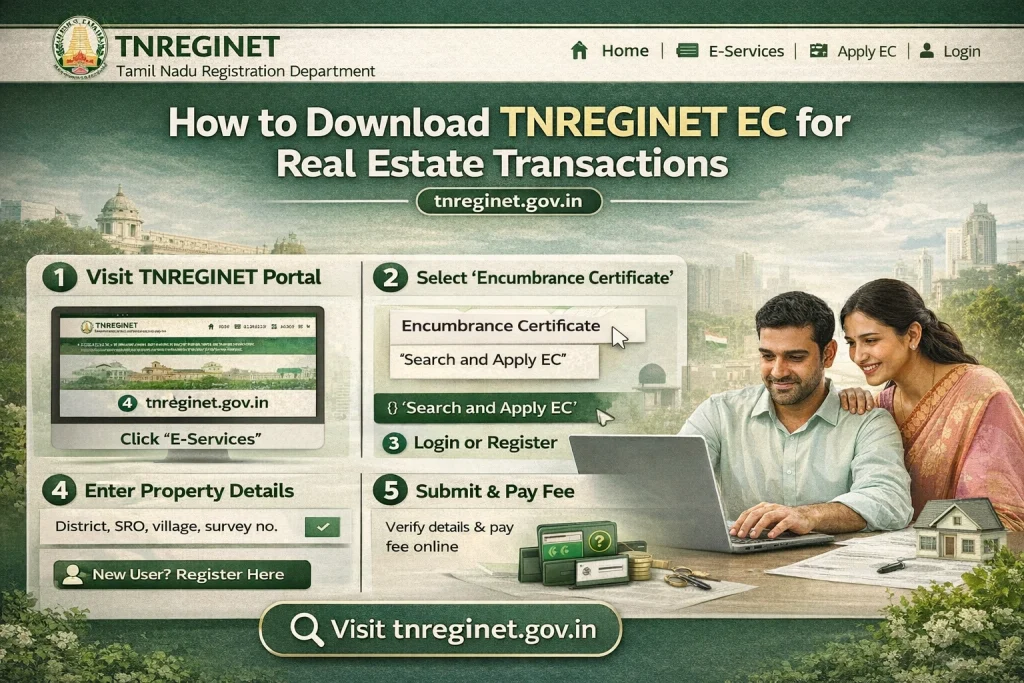
Step 1: Visit the TNREGINET Portal
- Go to the official TNREGINET website:
www.tnreginet.gov.in
Step 2: Log in to Your TNREGINET Account
- To download the EC, you must log in to your TNREGINET account. If you already have an account, enter your username and password to log in. If you don’t have an account, follow the Sign-Up process to create one:
- Click on “Sign Up” on the homepage.
- Fill in your details like name, email, phone number, and address.
- Once registered, you can log in using your new credentials.
Step 3: Navigate to the EC Search Section
- After logging in, navigate to the E-Services section. Here, look for the option to Search/View EC or Encumbrance Certificate. This section allows you to search for ECs using property details like survey number, district, and SRO (Sub-Registrar Office).
Step 4: Enter Property Details
- To search for the EC, you will need to provide some basic details about the property:
- District: Select the district where the property is located.
- Sub-Registrar Office (SRO): Choose the Sub-Registrar Office that handles the property’s registration in that area.
- Survey Number: Provide the survey number or document number of the property.
- Date Range: Choose the start and end date for the period you want the EC for (usually 15–30 years, depending on your requirements).
- Ensure that you provide accurate property details to get the correct EC.
Step 5: Complete CAPTCHA Verification
- You will be prompted to enter a captcha code to verify that you are not a robot. Simply enter the code as shown and click “Submit”.
Step 6: View the EC Details
- Once you’ve provided the required details and completed the CAPTCHA, click on the “Search” button. The portal will show the Encumbrance Certificate for the property based on the search criteria. You’ll be able to view the property’s transaction history, including:
- Sale deeds and transaction dates.
- Any mortgages or liens on the property.
- Details of the current and past property owners.
Step 7: Download the EC
- Once the EC is displayed on the screen, you can download it in PDF format for your records. If you need a certified EC (for official use like loan applications), you can request it directly from the portal. There is a nominal fee for the certified copy of the EC.
- To download:
- Click on the “Download” button next to the EC.
- Save the PDF to your computer or mobile device.
- You can now use this EC in your property transaction process.
You can also read: Why Does Guideline Value Change for the Same Property 2026?
How to Get a Certified EC (If Required)
In most cases, a certified EC is required for official purposes such as applying for a home loan or completing a property sale. Here’s how to get a certified EC:
Follow the Same Process: Go through the usual process of searching for the EC.
Request Certified Copy: After the EC is displayed, click on the “Request Certified Copy” option.
Pay the Fees: A nominal fee will be charged for the certification process. You can pay it online via the portal.
Download the Certified EC: Once the certification is complete, you will receive a digitally signed EC that will include a QR code for authenticity.
This certified EC is accepted by banks and legal authorities as an official document.
Tips for Downloading the EC Successfully
Accurate Property Details: Ensure that you enter the correct survey number and other property details to avoid errors in the search results.
Check the Correct Date Range: If you’re applying for a home loan or conducting a property sale, banks typically require the EC for 15–30 years. Make sure the date range is sufficient.
Browser Compatibility: If the portal isn’t working properly, try using a different browser or clear your browser’s cache and cookies.
Correct Sub-Registrar Office: Ensure that you select the right SRO (Sub-Registrar Office) for the property’s location to avoid discrepancies in the search results.
FAQs
Final Words
Downloading an Encumbrance Certificate (EC) from TNREGINET is an essential step in verifying the legal status of a property during real estate transactions. Whether you need the EC for property sale, home loans, or legal purposes, the TNREGINET portal makes it easy to access and download the required certificate.
By following the steps above, you can ensure a smooth and hassle-free property transaction process. Be sure to double-check the property details and date range to avoid errors and ensure that you have the correct EC for your needs.