TNREGINET EC Shows No Records? Fix It Fast Update 2026
If TNREGINET shows “No Records Found” when you search for an Encumbrance Certificate, do not panic. In many cases, the problem is not the property itself. It is usually a mismatch in the details you entered, the wrong Sub-Registrar Office, a narrow search period, or an online record that is not easy to pull up on the first try. The TNREGINET portal itself gives users separate tools for free EC view and Know Your Jurisdiction, which is a big clue: many failed EC searches start with wrong location details before the search even begins.
TNREGINET EC Shows No Records? Quick Fix Guide
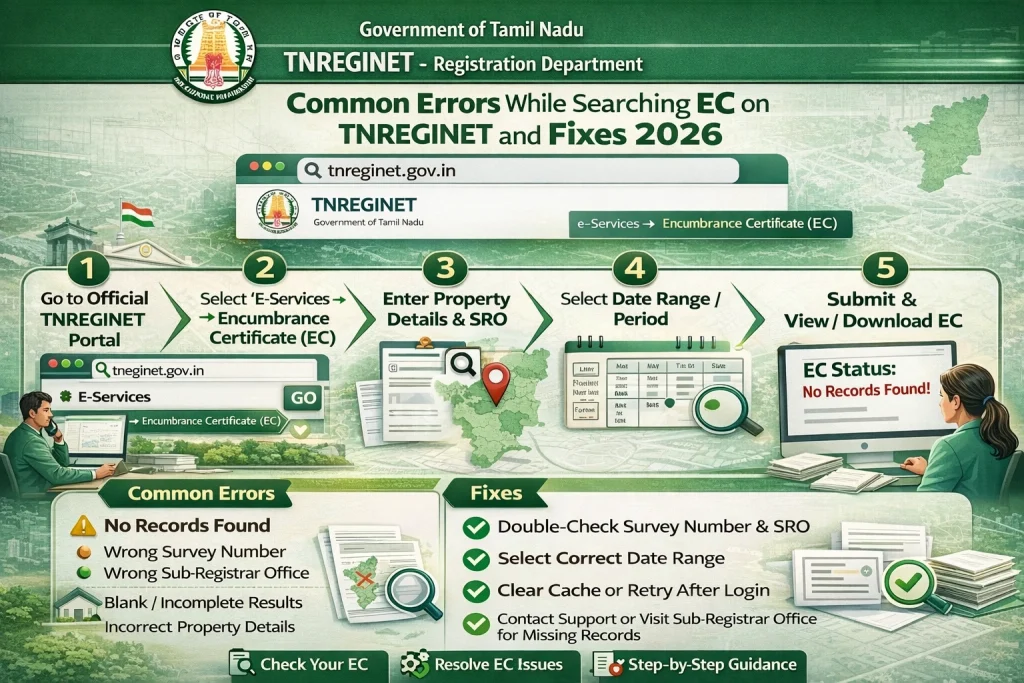
If your TNREGINET EC search shows no records, fix it in this order: first, match the property details exactly from your sale deed or old document; second, confirm the correct SRO using Know Your Jurisdiction; third, widen the date range; fourth, try a different search path like document number instead of name-based details; and fifth, go to the Sub-Registrar Office if the property is old, recently updated, or still not visible online. That order is more practical than the usual generic blog advice because it follows the way TNREGINET is actually structured.
Why TNREGINET shows “No Records Found”
The most common reason is simple: the portal cannot match what you typed with the registration record it has. Current TNREGINET guides and EC articles repeatedly point to wrong or incomplete property details, incorrect date range, name mismatch, and older or incomplete online records as the main causes. That means “No Records Found” does not automatically mean your property has no history. It can also mean your search did not line up with the stored record.
Another issue is jurisdiction. On the official TNREGINET homepage, Know Your Jurisdiction sits right beside the EC and certified-copy tools. That matters because if you choose the wrong office area or wrong local record path, your EC search can fail even when the property is genuine and registered.
You can also read: Common Errors While Searching EC on TNREGINET and Fixes 2026
Match the property details exactly
Start with your sale deed, document number, survey number, sub-division number, village, and owner name exactly as they appear in the document. Even a small mismatch can break the search. Some current EC guides also note that name-based searches can fail when initials, father’s name, or spelling format do not match the registered record exactly.
A simple tip: do not type from memory. Keep the document open and copy the details line by line. If your land has a sub-division, do not stop at the main survey number.
Check the correct SRO before searching again
This is the step many users skip. TNREGINET’s homepage includes a dedicated Know Your Jurisdiction tool, which shows that finding the right office area is part of the search process, not a separate extra step. If your SRO is wrong, your EC result can be wrong too.
So before you search again, use the jurisdiction tool and confirm the correct office for your street or village. Then repeat the EC search with the same property details.
Widen the date range
A narrow date range is another common reason for an empty result. If the transaction happened outside the years you selected, TNREGINET may show nothing even though the property has a valid registration history. Competitor guides and broader EC explainers both highlight the search period as a frequent source of confusion.
A good practical move is to search a wider period first. If you are checking ownership history before buying, a broader window is safer than a short one. If you are only checking a recent deed, still make sure your “from” and “to” dates actually cover that registration year.
Try a different search route
If one method fails, do not stop there. Try a second route using another strong identifier. For example, if name-based details are failing, try the document number. If you do not have the document number, try the survey number and location details from the deed. Current EC guides explain that document-based and property-description-based searches are often more reliable than name-only matching.
This is especially helpful when names appear in different formats across old records.
Use the free EC view first
The official TNREGINET portal explicitly offers “View/Download Encumbrance Certificate @ Free of Cost.” So if you are only trying to check whether the property record appears at all, start there. It is faster and helps you confirm whether the issue is with your search details before you move to other requests.
This matters because the portal also has separate flows for certified copy and other services. In other words, do not mix up a failed EC lookup with a different document-download process.
If the property is old or recently updated, do one more check
Some current TNREGINET-focused articles note that older records and recently updated registrations can be the hardest cases online. That is not an official TNREGINET rule, but it is a repeated pain point in live competitor content and matches what users commonly report.
So if your property is very old, inherited, rural, or recently registered, do one more careful search after confirming the SRO and date range. If it still fails, move to offline verification instead of repeating the same search again and again.
Go to the Sub-Registrar Office with the right papers
If TNREGINET still shows no records, the smartest next step is the Sub-Registrar Office. Carry your sale deed copy, document number, survey number, sub-division number, village details, and any supporting records like Patta, Chitta, or a tax receipt. Current guides also recommend carrying earlier property records if ownership changed multiple times.
This saves time because the office can verify whether the issue is a search mismatch, a record-location issue, or an older entry that is not easy to see online.
Common mistakes to avoid
One common mistake is searching with only half the property details. Another is choosing the wrong SRO. A third is setting a short date window and assuming “no record” means “no issue.” Competitor articles keep repeating these same mistakes, which tells us users hit them often.
The fastest way to avoid all three is simple: check the deed, confirm the jurisdiction, and search a wider period first.
Does “No Records Found” mean the property is clean?
Not always. It may mean there are no registered entries in the exact period and details you searched, but it can also mean your search inputs did not match the record. That is why you should not treat one failed EC search as final proof of anything.
Simple checklist before you search again
Use this quick checklist:
Match the survey number and sub-division from the deed
Confirm the correct SRO with Know Your Jurisdiction
Search a wider date range
Retry with document number if available
Visit the SRO if the property is old, inherited, or still missing online
FAQs
Final Words
If TNREGINET EC shows no records, the fastest fix is not guessing. It is checking the exact deed details, confirming the right SRO, widening the date range, and retrying with a stronger search input like the document number. If that still does not work, go to the Sub-Registrar Office with your papers. That gives you a real answer much faster than repeating the same online search.