How to Track EC Application Status on TNREGINET Update (2026)
If you have requested an Encumbrance Certificate (EC) through TNREGINET, it is important to track the status of your application. Knowing the progress helps you plan for property deals, bank submissions, or legal verifications without delays.
Why Tracking EC Status Is Important
Tracking your EC application ensures:
You can also read: EC Login vs Guest Access Differences in TNREGINET Update 2026
Prerequisites to Track EC Status
Before tracking, ensure you have:
Tip: Guest users cannot track EC requests; only registered accounts allow tracking.
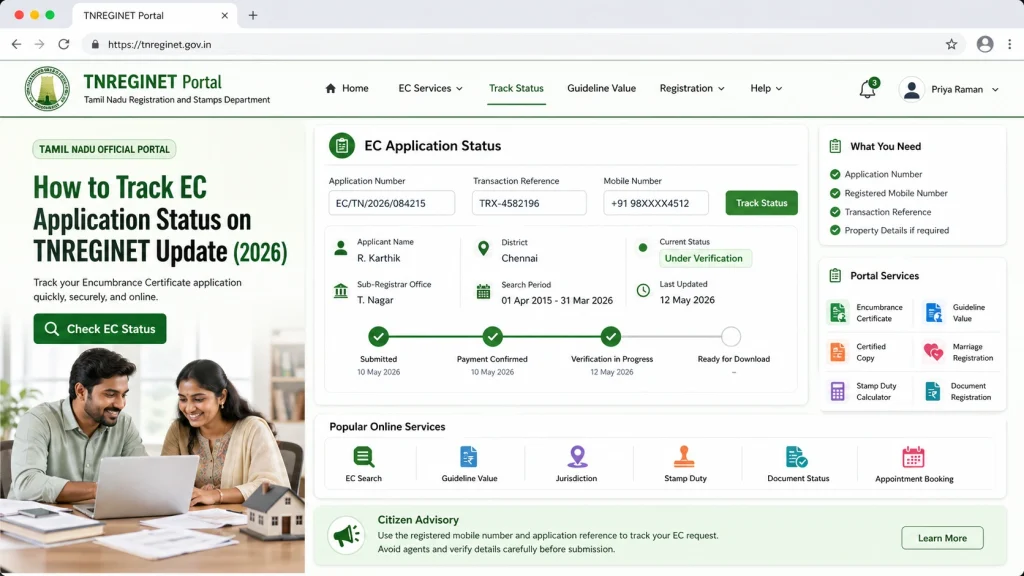
Step by Step Track EC Application Status on TNREGINET
Step 1: Login to TNREGINET
Visit the official TNREGINET portal.
Enter your username and password.
Complete any OTP verification if prompted.
Tip: For first-time users, register to access certified EC downloads and status tracking.
Step 2: Navigate to EC Application Section
After login, go to the EC Services or Encumbrance Certificate Request section.
Look for the option “Track EC Application” or “EC Request Status”.
Tip: The section name may vary slightly depending on TNREGINET updates, but it’s usually under the EC menu.
Step 3: Enter Request Details
Enter EC request ID (provided at the time of application) or property details:
Survey number
Plot number
SRO office
Select the date range of your EC application if prompted.
Tip: Double-check details to avoid errors or empty results.
Step 4: Check Status
After submitting, the portal will show:
Rejected / Requires Correction – Some details may be missing or incorrect; action is required.
Application Received – Your request is submitted successfully.
Under Processing – The SRO is verifying documents and details.
Approved / Ready to Download – EC is certified and available for download.
Step 5: Download EC After Approval
Once the status shows Approved / Ready, click Download Certified EC.
Verify that the EC is digitally signed.
Save a copy for bank submission, legal verification, and personal records.
Tip: Keep multiple copies to avoid repeated downloads and ensure backup in case of system errors.
Common Issues While Tracking EC Status
Incorrect Request ID or Property Details – Double-check the information.
Portal Downtime or Heavy Traffic – Try during off-peak hours.
Missing Updates – Some applications may take 24–72 hours to reflect online.
Guest Users Cannot Track – Ensure you are logged in with a registered account.
Quick Tips for Smooth EC Status Tracking
FAQs
Final Words
Tracking your EC application on TNREGINET ensures that you stay updated, avoid delays, and can download your digitally certified EC promptly for banks or legal purposes. Always use a registered login account, keep your request ID ready, and monitor updates regularly to ensure smooth property verification.