How to Use TNREGINET for Property Verification in Tamil Nadu
When it comes to buying or selling property in Tamil Nadu, it is essential to verify the authenticity and legal status of the property. TNREGINET, the official online portal for the Tamil Nadu Registration and Stamps Department, allows you to easily verify property details and ensure that there are no legal issues or discrepancies before proceeding with any transactions. Whether you’re a buyer, seller, or investor, understanding how to use TNREGINET for property verification can help you avoid legal problems and ensure that the transaction goes smoothly.
In this guide, we’ll explain the simple steps for using TNREGINET to verify property details in Tamil Nadu.
Why Use TNREGINET for Property Verification?
The TNREGINET portal provides an easy and transparent way to verify property records. Here’s why you should use TNREGINET for property verification:
Legally Certified Information: TNREGINET allows you to access official records from government databases, ensuring the information is accurate and up-to-date.
Check Ownership History: You can confirm the owner’s details and ensure there are no disputes related to the property.
Verify Encumbrances: By viewing the Encumbrance Certificate (EC), you can check if the property has any legal claims or financial liabilities.
Ease of Access: You can perform property verification online without needing to visit government offices.
You can also read: What Are the Legal Uses of a Certified EC from TNREGINET?
How to Verify Property Details Using TNREGINET
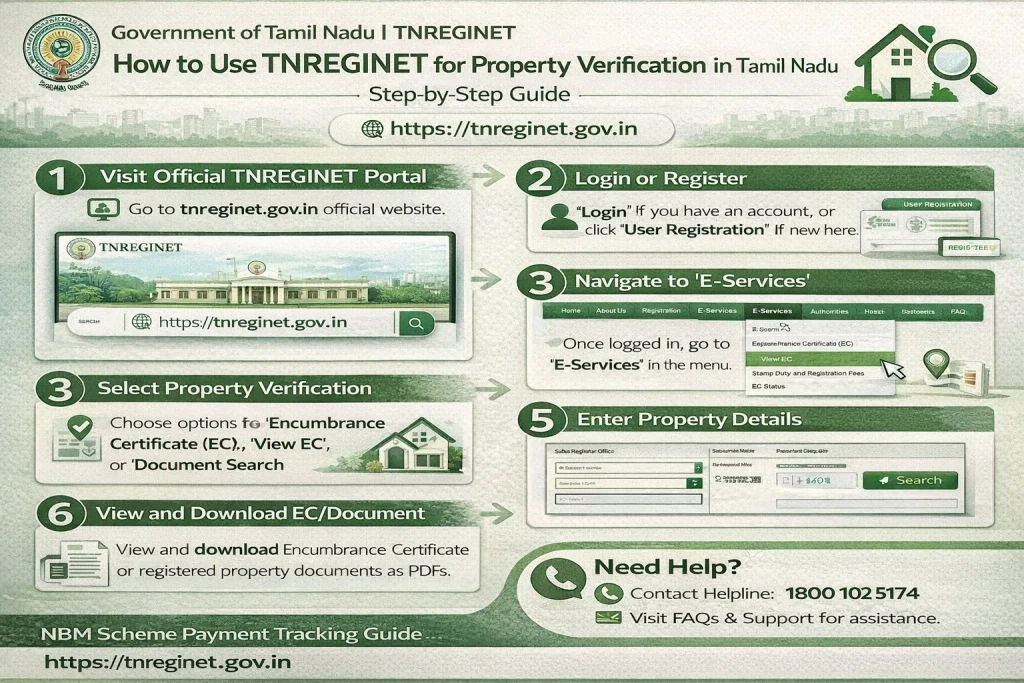
Step 1: Visit the TNREGINET Portal
Start by going to the official TNREGINET website:
tnreginet.gov.in
Step 2: Log in or Register
To access property details, you’ll need to log in to your TNREGINET account. If you don’t have an account, follow these steps:
Once your account is created, log in using your credentials.
Click on “Register” to create a new account.
Enter Your Details: You’ll need to provide information such as your name, email address, and phone number.
Step 3: Navigate to Property Verification Section
After logging in, look for the “E-Services” section on the portal. In this section, you will find options related to property verification. Select the relevant option based on what you need to verify.
For property verification, you can check the following:
Sale Deed or Document Search: To verify specific transactions related to the property.
Encumbrance Certificate (EC): For verification of ownership history and whether there are any mortgages or liens.
Guideline Value: To view the minimum value of the property for stamp duty purposes.
Step 4: Enter Property Details
To verify property details, you’ll need to provide specific information, such as:
- Survey Number: This is the unique identifier for the property. It is available in your property records.
- District: Choose the district where the property is located.
- Taluk (Sub-District): Select the taluk or sub-district where the property is located.
- Sub-Registrar Office (SRO): Choose the appropriate SRO that handles the property registration for that area.
You may also need to provide the document number or period for which you want to verify the details.
Step 5: Search and View Property Details
After entering the required details, click on the “Search” button to view the property details.
For sale deed or document search, you can view the official records related to that property.
If you are checking the Encumbrance Certificate (EC), you’ll be able to see all the registered transactions, including sales, mortgages, and other encumbrances.
If you are checking Guideline Value, you’ll get the minimum value assigned to the property for stamp duty calculations.
Step 6: Download Property Documents (Optional)
Once the property details are displayed, you can:
- View the EC to verify the property’s ownership and transactions.
- Download the EC or Document for future reference or submission to the bank or other authorities.
- If required, you can also request a certified copy of the EC or other documents directly from the portal.
For certified documents, there might be a small fee involved.
How to Verify the Encumbrance Certificate (EC)
The Encumbrance Certificate (EC) is one of the most important documents for property verification. It provides a detailed record of all the transactions related to a property during a given period.
Steps to View EC:
Go to the “Encumbrance Certificate” Section: Under the E-Services menu, choose the “Search/View EC” option.
Enter Property Details: Provide the Survey Number, District, Taluk, and Date Range.
View or Download the EC: The portal will display all the transactions recorded against the property during the specified period. You can view the details or download the certificate.
This EC will show:
How to Verify the Guideline Value of a Property
The Guideline Value is the minimum price set by the Tamil Nadu government for registering a property in a specific area. This value is used to calculate stamp duty and registration charges.
Steps to Verify Guideline Value:
Go to the “Guideline Value” Section: Look for the “Guideline Value” option under the E-Services menu.
Enter Property Details: Provide the district, taluk, village, and survey number.
View the Guideline Value: You will see the minimum value set for your property, which is used for calculating stamp duty and other fees.
The Guideline Value helps you understand the minimum market value of the property and ensure that the transaction value is in line with the government-assigned rate.
How to Verify Property Documents (Sale Deed, Title Deed, etc.)
If you want to verify specific documents, such as the Sale Deed or Title Deed, you can do so through TNREGINET. These documents confirm the legal transfer of ownership and verify property details.
Steps to Verify Property Documents:
Go to the “Document Search” Section: Under the E-Services menu, select “Document Search”.
Enter Document Number: Provide the document number and the year of registration to search for the specific property document.
View the Document Details: You will be able to view the official record of the sale deed, title deed, or other related documents.
Common Issues and Troubleshooting Tips
While using TNREGINET for property verification is easy, you may face a few issues. Here’s how to address them:
Incorrect Property Details: Double-check the survey number, district, and other property details to ensure they are correct.
No Results Found: If you get no results, verify the time period for EC and ensure that you are searching in the correct SRO jurisdiction.
Slow Loading: If the portal is loading slowly, try clearing your browser cache or using a different browser for better results.
FAQs
Final Words
Using TNREGINET for property verification is a quick and reliable way to ensure that the property you’re dealing with has a clear legal title, no encumbrances, and is free from disputes. By following the simple steps outlined above, you can easily verify the ownership history, market value, and official documents related to the property. This helps ensure that your property transaction is smooth and legally sound.