Why Your TNREGINET EC Might Be Missing Property Data 2026
The Encumbrance Certificate (EC) is a crucial document in property transactions. It shows the legal history of property ownership, including transactions such as sales, mortgages, and encumbrances. However, sometimes the EC on TNREGINET may show incomplete or missing data about your property. If you’ve faced this issue, it can be frustrating, especially when you need the EC for legal purposes, such as property registration or loan applications.
In this article, we will explore the common reasons why your TNREGINET EC might be missing property data and how you can resolve these issues.
Common Reasons for Missing Property Data on TNREGINET EC
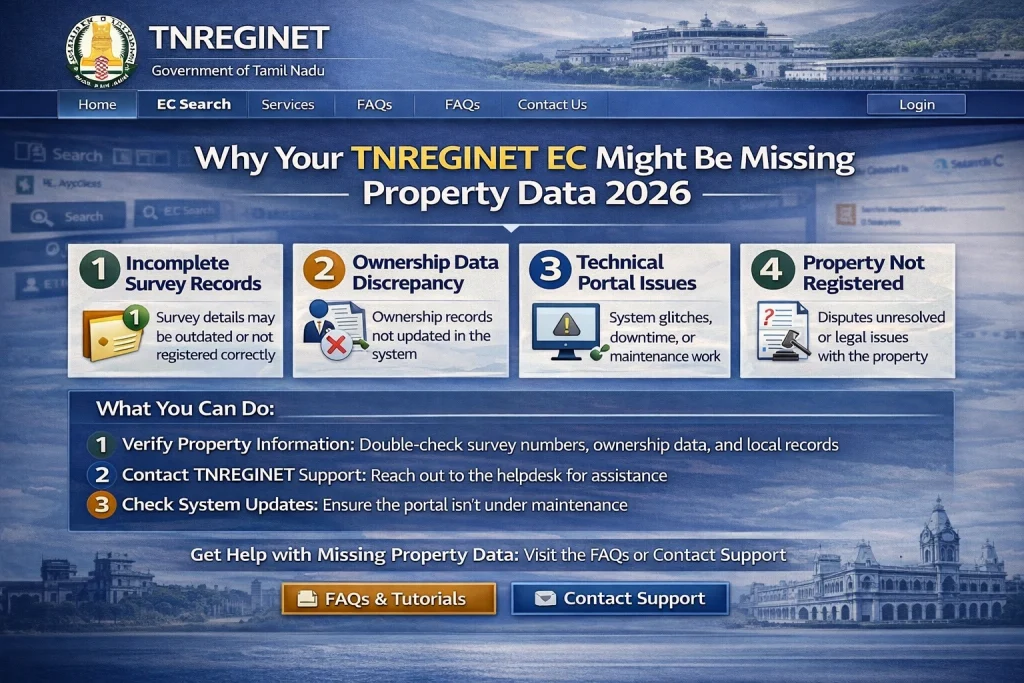
Incorrect Property Details Entered
Problem: If the property details entered on TNREGINET (like survey number, district, or sub-registrar office) are incorrect or incomplete, the system may fail to retrieve the correct property data.
Solution: Double-check the survey number, document number, and property type entered in the search form. Ensure that all details are accurate and match the records you have.
Tip: Always use the official property documents, such as the Sale Deed, Patta, and Chitta, to verify the property details before entering them on TNREGINET.
Data Not Updated in the System
Problem: TNREGINET may not have the latest property transaction details or registration information if they haven’t been updated in the government’s land records system. This can happen if there was a delay in registering the property or if the property’s data wasn’t digitized.
Solution: Contact the Sub-Registrar Office where the property was registered. They may provide you with a physical or manually updated EC for the missing data.
Survey Number or Plot Details Missing from the Database
Problem: In some cases, the survey number or plot details may not be recorded in the digitized land records of TNREGINET. This is often the case with older properties that haven’t yet been digitized or those where the survey details were not properly entered.
Solution: Visit the local revenue office (Taluk Office) or Sub-Registrar’s Office to verify if the survey number or property details are available in the manual records. They may help you retrieve the missing property data.
Discrepancies Between Sale Deed and Official Records
Problem: Sometimes, discrepancies arise between the Sale Deed and the records in the government’s land registry. If there are mistakes in the official documents or discrepancies in names, dates, or survey numbers, it could lead to missing or incorrect data on the EC.
Solution: If you suspect discrepancies, you’ll need to request a correction or amendment of the records from the Sub-Registrar Office or the revenue department.
Tip: Ensure all property-related documents (e.g., Sale Deed, Patta, Chitta) match each other before initiating any transaction.
EC Generated for a Shorter Period
Problem: The Encumbrance Certificate may only display data for a specific time period, which could lead to missing data if you are looking for historical transactions outside that period.
Solution: Check the start and end dates you selected when requesting the EC. If you need data for multiple years, you’ll have to request multiple ECs by changing the date range.
Tip: To get data for earlier periods, request the EC for the specific years that match the property’s history.
Technical Issues with TNREGINET
Problem: Sometimes, missing data could be a result of technical issues or glitches on the TNREGINET portal. This can happen due to server errors or incorrect data syncing between the government’s land records and the portal.
Solution: If you suspect a technical issue, try refreshing the page or clearing your browser cache and cookies. You can also try accessing the portal using a different browser. If the issue persists, contact TNREGINET support for assistance.
You can also read:How to Get Correct Survey Details for Your TNREGINET EC 2026
How to Resolve Missing Property Data on Your TNREGINET EC
Verify Property Information
Before requesting an EC, double-check the property details in your documents. Ensure that the survey number, district, sub-registrar office, and other relevant details are correct.
Use Alternative Sources
If TNREGINET does not provide the data, check other official records, such as Patta, Chitta, or Sale Deeds, to verify the correct property details.
Visit the Sub-Registrar or Taluk Office
If the missing data is not available online, you can visit the Sub-Registrar Office or Taluk Office where the property was registered. These offices maintain manual records and can provide information about your property.
Request Corrections if Needed
If there is a mismatch between the EC and other official records, or if there are discrepancies in property details, you can request a correction at the Sub-Registrar Office. Bring all relevant documents with you to facilitate the process.
Contact TNREGINET Support
If you believe the missing data is due to a technical issue on the portal, contact TNREGINET support. They can help investigate and provide assistance in resolving the issue.
FAQs
Final Words
If your TNREGINET EC is missing property data, it’s important to identify the cause quickly. Whether it’s due to incorrect data entry, technical issues, or missing updates, following the right steps can help you resolve the issue. Always ensure that your property details are accurate in official documents, and don’t hesitate to visit the Sub-Registrar Office or contact TNREGINET support if needed.
By addressing these issues promptly, you can ensure a smooth property transaction process and avoid any delays or complications with your Encumbrance Certificate.