TNREGINET EC Search: Why Does It Show Different Results 2026?
If you’re using TNREGINET to check the Encumbrance Certificate (EC) for a property, you may sometimes notice that the search results don’t match your expectations. This can be frustrating, especially when you’re trying to verify property records for legal purposes. Understanding why TNREGINET EC search shows different results can help you troubleshoot and ensure that you’re getting the correct information.
Here’s a simple guide to help you understand why you might be seeing inconsistent EC results and what you can do about it.
Incorrect Search Parameters
One of the most common reasons you might see different EC results is due to incorrect or incomplete search parameters. When searching for an Encumbrance Certificate on TNREGINET, you need to make sure you enter the correct details to get the right results.
Common search parameters include:
If any of these details are entered incorrectly or are missing, the search results may not match your expectations.
Tip:
Double-check that the Survey Number is correct and up-to-date.
Make sure that the start and end dates for the EC search cover the period you’re looking for (e.g., for loans, banks often request ECs for 15–30 years).
You can also read: Understanding TNREGINET’s Market Value vs. Guideline Value
Data Synchronization Delays
Another reason for discrepancies in your EC search results could be data synchronization issues at the Sub-Registrar Office (SRO). TNREGINET relies on accurate data from various Sub-Registrar Offices across Tamil Nadu, and sometimes the data might not be updated or synchronized properly in the system.
Common scenarios include:
Newly registered properties or transactions may not yet reflect in the online records.
Older records (pre-2005 or earlier) may be missing or difficult to access if they haven’t been digitized properly.
Tip:
If you’re unable to find a record or it appears outdated, try checking again after a few days or contact your local SRO for assistance.
Different Types of EC Searches
TNREGINET offers several types of EC searches, and choosing the wrong one can lead to different or unexpected results. There are two main types of searches you can perform:
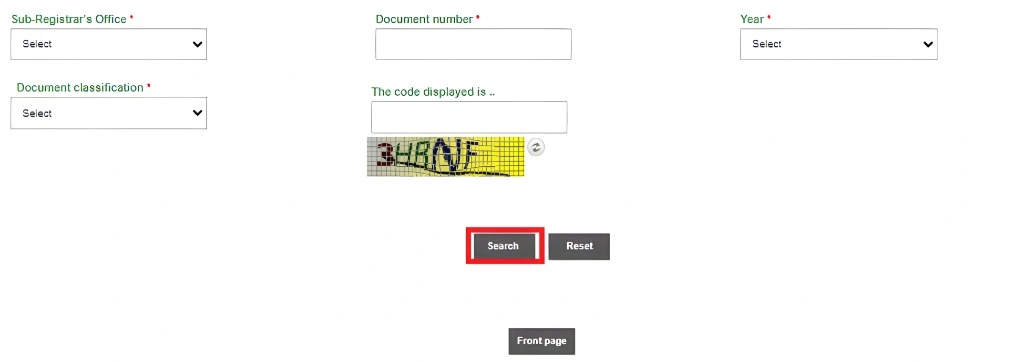
Document-wise Search: This search uses a specific document number (such as a sale deed number) to find records.
Property-wise Search: This search is based on the survey number or plot number and the property location.
If you’re looking for a specific transaction but use the wrong type of search (e.g., document number search instead of property search), it can show different or incomplete results.
Tip:
Use the Property-wise search when looking for general property records.
Use Document-wise search if you know the exact deed or document number from the sale or transaction.
Incomplete or Missing Records
In some cases, older property records may not be available online. Some ECs may not display transaction details or might show as “No records found,” especially if the records are not fully digitized or if certain data is missing.
This is particularly common for pre-2000 records or properties that underwent multiple transactions before the digitization process began.
Tip:
If you’re unable to retrieve a complete EC online, you can visit the Sub-Registrar Office (SRO) directly to access physical records or request an official certified EC copy.
Incorrect or Missing Owner Information
Another issue can be incorrect ownership information or property details. If the owner’s name or property information doesn’t exactly match what’s in the TNREGINET system, the EC search might show incomplete or inaccurate results. This often happens with properties that have undergone recent transactions or changes in ownership.
Tip:
Make sure the property details, such as owner names and other information, match the official documents (sale deed, title deed, etc.).
If there have been changes in ownership (such as inheritance, sale, or gift), ensure those updates are reflected in the system.
Technical Issues and Browser Problems
Sometimes, technical glitches or browser-related issues can cause the search results to show incorrect or incomplete data. This may include slow loading times, incomplete data retrieval, or visual discrepancies in the search results.
Tip:
Try clearing your browser cache and cookies, or use a different browser if you’re encountering loading or display issues.
Ensure that your internet connection is stable while accessing the TNREGINET portal.
Different SRO Jurisdiction
If you mistakenly search for an EC using the wrong Sub-Registrar Office (SRO) jurisdiction, it could show incorrect or no results. This happens when the property belongs to a different jurisdiction than the one you’re searching in.
Tip:
Always confirm the correct Sub-Registrar Office jurisdiction based on your property’s location (village, district, and taluk). You can use the TNREGINET portal to verify the jurisdiction or contact your local SRO for clarification.
FAQs
Final Words
While discrepancies in TNREGINET EC search results can be frustrating, most of the time, they are due to simple issues like incorrect search parameters, outdated records, or technical glitches. By carefully checking the details you input and understanding the various factors that affect the search, you can avoid errors and ensure you’re accessing accurate property records. If you continue facing issues, don’t hesitate to reach out to the Sub-Registrar Office (SRO) for clarification or assistance.