How to Authenticate Your TNREGINET EC for Bank Loans 2026
When applying for a home loan or any other property-related loan, one of the key documents that banks require is the Encumbrance Certificate (EC). The TNREGINET portal offers an easy way to get the EC online, but authenticating the EC is just as important, especially when you need it for official purposes like securing a bank loan. Let’s walk through how to authenticate your TNREGINET EC and ensure it’s legally valid for use in bank loan applications.
What is an Encumbrance Certificate (EC)?
An Encumbrance Certificate (EC) is a legal document issued by the government to show the history of transactions on a property. It provides proof of ownership and verifies that the property is free from any legal liabilities (like loans or mortgages). When applying for a loan, banks require an EC to verify that the property you are offering as collateral is legally clear.
You can also read:Why TNREGINET Search Doesn’t Work for Village Names 2026
Why Do You Need to Authenticate Your TNREGINET EC?
While you can view and download EC online from the TNREGINET portal, an authenticated EC is required by banks for legal and official purposes. Here’s why:
Legality and Acceptance: A viewable EC from the portal is not always legally accepted by banks, as it may not have the official verification needed for property transactions.
Verification: The authenticated EC is signed and sealed by the Sub-Registrar Office, proving that the document is genuine and valid for official use, including bank loan processing.
Trust: An authenticated EC gives the bank the assurance that the property is legally clear, ensuring there are no disputes or legal claims on the property.
Steps to Authenticate Your TNREGINET EC for Bank Loans
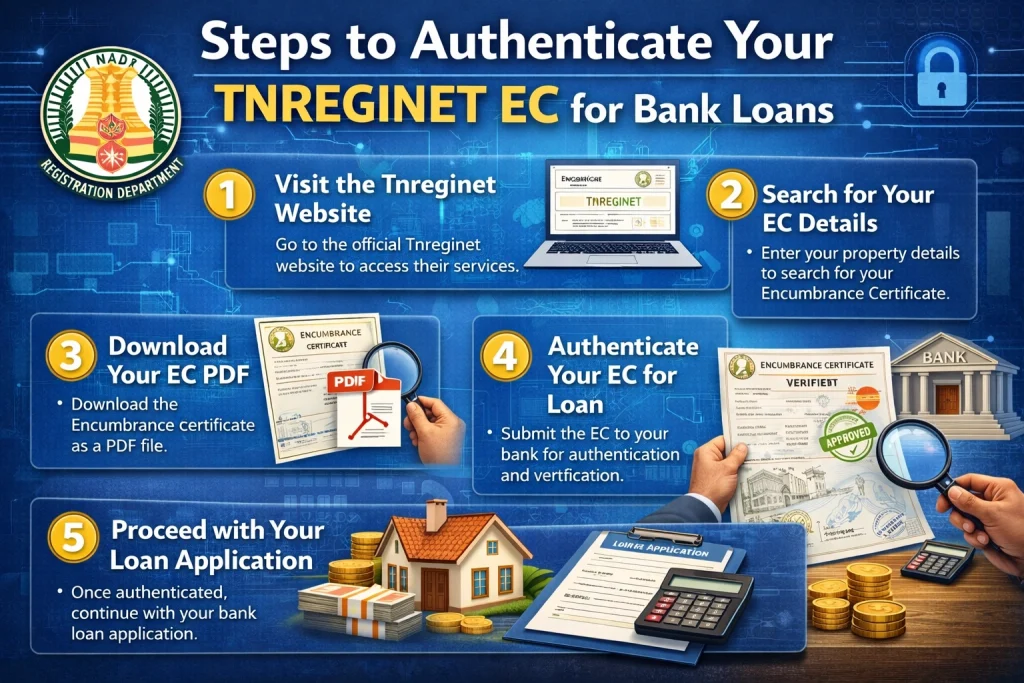
Here’s how to authenticate your TNREGINET EC to make it valid for bank loan applications:
Apply for EC on TNREGINET
To begin the process, you need to obtain the Encumbrance Certificate from the TNREGINET portal. Here’s how:
- Go to the official TNREGINET website: https://www.tnreginet.gov.in
- Navigate to the “Encumbrance Certificate” section.
- Fill in the required details such as the property survey number, sub-registrar office, date range, and other relevant information.
- Click on Submit to view and download the EC.
This is a viewable EC, but it is not yet authenticated for bank loan purposes.
Get the EC Certified by the Sub-Registrar Office
Once you have the viewable EC from the TNREGINET portal, the next step is to get it authenticated by the Sub-Registrar Office (SRO) where the property is registered. To do this:
- Visit the local Sub-Registrar Office (SRO) that handled the original property registration.
- Submit the viewable EC (downloaded from TNREGINET) along with the application form for certification.
- Provide proof of identity, such as your Aadhar card, voter ID, or passport, as required by the office.
- The Sub-Registrar Office will verify the EC and authenticate it with an official signature and seal.
Note: Some Sub-Registrar Offices may have an online application system for certified ECs. You can check if you can submit your request and get the certified EC online, depending on the local office.
Pay the Certification Fee
There is a nominal fee for certifying the EC, which can vary depending on the district and type of document. The fee is generally affordable and is required to process the authentication of the EC.
Once the fee is paid, you will receive an authenticated EC that is officially recognized by banks and other financial institutions.
The fees may be higher if you request a certified EC for multiple years.
Submit the Authenticated EC to the Bank
Once you receive the authenticated EC, it is ready to be submitted to the bank for your loan application. This certified EC will be used by the bank to:
Process your loan request smoothly.
Verify the ownership of the property.
Ensure the property is free from encumbrances (i.e., it is not mortgaged or under any legal dispute).
How Long Does It Take to Authenticate the EC?
The time it takes to authenticate an EC at the Sub-Registrar Office can vary depending on the office’s workload and your location. Typically, it may take anywhere from a few days to a couple of weeks for the authentication process to be completed. It’s best to check with the local Sub-Registrar Office for an estimated timeline.
What if I Can’t Authenticate My EC Immediately?
If for any reason, you cannot authenticate your EC immediately, here’s what you can do:
Contact the Sub-Registrar Office to inquire about any issues or delays.
Request an expedited process if it’s urgent, especially if it’s required for a loan or property sale.
If the property is older or there are missing records, the office may ask you to submit additional documents or proof of ownership.
FAQs
Final Words
Getting your TNREGINET EC authenticated for a bank loan is an essential step in securing your loan. The viewable EC from TNREGINET is a great starting point, but it’s the authenticated EC—signed and sealed by the Sub-Registrar Office—that will be accepted by banks for legal and financial purposes. By following the steps above and ensuring your EC is properly authenticated, you’ll have no trouble proceeding with your property transaction or loan application.