How to Correct Incorrect Survey Numbers in TNREGINET 2026
When dealing with property transactions or searching for an Encumbrance Certificate (EC) on the TNREGINET portal, an incorrect survey number can cause issues. If you’ve encountered problems finding your property records or the EC due to an incorrect survey number, don’t worry. This article will guide you through the process of correcting an incorrect survey number on TNREGINET.
What is a Survey Number?
A survey number is a unique identifier assigned to a specific piece of land in the revenue records. It is essential for property transactions as it ensures that the property is accurately identified and recorded in official records. The survey number is used when registering properties, verifying ownership, and searching for an Encumbrance Certificate.
If the survey number is incorrect in the TNREGINET system, you may not be able to view the correct property records or obtain an accurate EC.
You can also read:TNREGINET EC: A Step-by-Step Guide for Beginners Update 2026
Why Do Survey Numbers Get Incorrect in TNREGINET?
There are a few reasons why the survey number may appear incorrectly on TNREGINET:
Human error: During the manual entry of property details or during digitization, incorrect data may have been entered.
Changes in Survey Numbers: Sometimes, the survey numbers change due to property subdivision or re-surveying.
Mismatch in Records: The details entered into the TNREGINET portal may not match with the official records held by the Sub-Registrar Office or revenue department.
Steps to Correct Incorrect Survey Numbers in TNREGINET
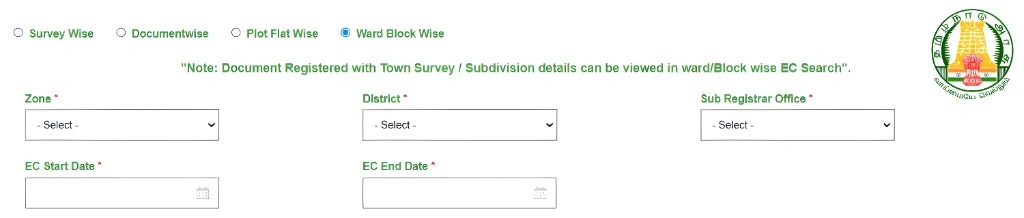
If you’ve found that the survey number is incorrect in TNREGINET, here’s what you need to do to correct it:
Step 1: Verify the Correct Survey Number
Before proceeding, you must ensure that you have the correct survey number. To do so:
In some cases, re-surveys or subdivisions might have led to a new survey number being issued. Confirm the latest survey number from the Sub-Registrar Office.
Check your property documents such as the sale deed, title deed, or patta. These documents should have the correct survey number.
If you don’t have these documents, you can visit your local Sub-Registrar Office (SRO) or the revenue department to obtain the correct survey number.
Step 2: Visit the Sub-Registrar Office (SRO)
Once you have confirmed the correct survey number, you will need to visit the Sub-Registrar Office (SRO) where the property is registered. The SRO handles property records, and they will assist in correcting any mistakes in the survey number.
What to do at the Sub-Registrar Office:
Submit the Request: Provide the correct survey number and relevant property details. The SRO will verify your request and update the records.
Bring Property Documents: Take your sale deed, title deed, and any other relevant documents that show the correct survey number.
Fill out the Correction Request Form: Ask the staff to provide the form to request a correction of the survey number in the official records.
Step 3: Verify and Update the TNREGINET Record
After the Sub-Registrar Office has corrected the survey number in their records, it might take a few days or weeks for the TNREGINET portal to reflect the updated information. You can:
- Request a Certified EC: After the correction, you may need to request an updated Encumbrance Certificate (EC) to ensure that it reflects the correct survey number.
- Visit the TNREGINET portal again: Once the records are updated, log in to TNREGINET and search for the property using the corrected survey number. This should allow you to view the correct property details and EC.
If the records have not been updated on TNREGINET after some time, visit the Sub-Registrar Office again to ensure the system has processed the correction.
Step 4: Follow Up
If the survey number still shows incorrectly after several weeks:
Check with TNREGINET support: If everything looks correct at the SRO, but TNREGINET still shows the wrong survey number, you can contact TNREGINET support for assistance.
Follow up with the SRO: Visit or contact the Sub-Registrar Office to ensure the correction has been properly processed in the system.
Tips to Avoid Survey Number Mistakes in the Future
Always double-check your documents: When entering details into TNREGINET, make sure the survey number is exactly the same as in your official property documents.
Stay updated: If there has been a property subdivision, re-survey, or change in the survey number, make sure your property records are updated accordingly with the relevant authorities.
Request updates immediately: If you notice discrepancies in the survey number after a recent property transaction, act quickly to avoid future complications when you need to access official documents.
FAQs
Final Words
Correcting an incorrect survey number in TNREGINET is crucial for ensuring that your property records are accurate. By following the steps above, you can easily correct any mistakes at the Sub-Registrar Office and get the updated Encumbrance Certificate (EC) for your property. Always double-check the survey number and other property details to avoid delays or issues in your property transactions.